5 Best SafelyYou Alternatives for Senior Living (2026)
SafelyYou is one of the most established fall management platforms in senior living. It’s especially popular with memory care communities that want fall video review backed by a remote clinical team. But it doesn’t fit every community.
Care and operations teams often run into the same problems. Cameras record video in resident bedrooms, coverage is limited to residents who opt in, and bathrooms go uncovered because cameras don't belong there. For communities whose residents and families have strong privacy expectations, or teams that want every room covered and not only enrolled ones, these issues can slow adoption or leave blind spots in a safety program.
This article covers five SafelyYou alternatives, from thermal sensors and anonymized computer vision to wearables and smart lamps. For each platform, we'll cover how it works, how it compares to SafelyYou, pros and cons, and the type of community it fits best.
Shortcomings of SafelyYou
SafelyYou combines AI fall detection, fall video review, and a clinical team of RNs, OTs, and PTs who help communities turn falls into care plan changes. It supports more than 1,000 communities, and research links it to fewer falls and fewer fall-related ER visits.
That approach depends on cameras in resident bedrooms, which brings tradeoffs, especially for communities that prioritize privacy or teams that want every room covered.
- Video in resident bedrooms. SafelyYou’s fall detection uses AI-enabled cameras, and the company advertises clear fall video that staff and SafelyYou’s remote clinicians review. That’s a bigger privacy step than blurred imagery or no imagery at all, and some residents and families won’t agree to it.
- Coverage is limited to residents who opt in. Cameras activate only after consent, so a community’s coverage depends on its enrollment rate. Residents who decline get no fall detection from the system.
- Bathrooms remain a gap. SafelyYou’s resident FAQ states that cameras aren’t placed in bathrooms, which are among the highest-risk rooms for falls. Its current materials don’t describe a separate bathroom device.
- A broader platform means broader monitoring. SafelyYou now spans fall detection, staff presence tracking, virtual check-ins, hourly overnight wellness checks, wellness reporting, and its own emergency call system. Teams that only need fall alerts may end up adopting more monitoring than they planned, and staff-tracking features can raise concerns among care teams.
The five alternatives below handle these trade-offs in different ways.
Best SafelyYou Alternatives at a Glance
| Platform | Best For |
|---|---|
| Butlr Care | Camera-free, real-time fall alerting and routine insights in every room, including bathrooms |
| Teton | Operators who want camera-level room understanding with on-device processing and no stored video |
| Inspiren | Communities ready to replace their emergency call system with an all-in-one platform that bundles fall detection and eCall |
| CarePredict | Wearable-based fall detection and location tracking that follows residents beyond their rooms |
| Nobi | Fall detection built into room lighting, with two-way voice through the fixture |
Butlr Care
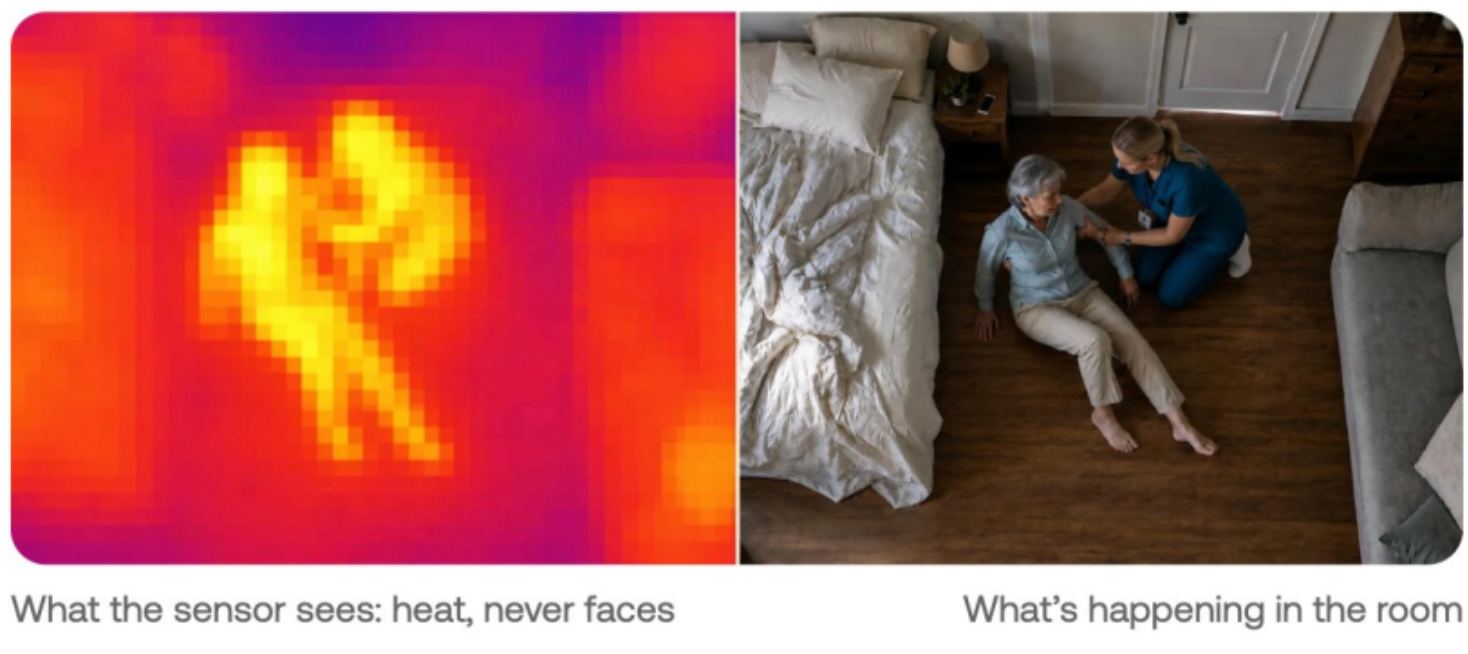
Butlr Care is ambient, camera-free monitoring built for senior living, and it’s currently in pilot with communities. A ceiling-mounted Heatic sensor reads only anonymous heat signals and never captures images, faces, or identities.
Butlr Care was shaped with input from older adults and researchers through a MassAITC pilot project led by UMass Amherst, Hebrew SeniorLife, and Butlr. MassAITC is funded by the National Institute on Aging. It surfaces behavioral and activity signals and does not provide medical diagnoses.
No Video for Anyone to Watch
Thermal sensing produces no footage, so there’s nothing to record, store, review, or delete. Staff receive alerts and trends only.
With SafelyYou, fall video is reviewed by community staff and by clinicians outside the community, and someone has to manage retention policies for that footage. Butlr Care removes both.
Without footage, residents keep more dignity, and staff have simpler conversations with families. When a daughter asks what the sensor in her mother's room can see, staff can tell her it senses only heat.
Bedrooms and Bathrooms Covered by One Sensor Type
The same sensor works in bedrooms and bathrooms. Room, bed, and bathroom zone entry and exit alerts all come from one device, so staff don’t have to learn separate hardware for different spaces.
Because the sensor captures no images, coverage isn’t capped by how many residents agree to cameras. Communities still inform residents and families before go-live, and Butlr provides ready-to-share consent and notification materials for that step. The conversation is simpler, though, since there’s no video to consent to.
Daily Routine Signals That Flag Rising Fall Risk
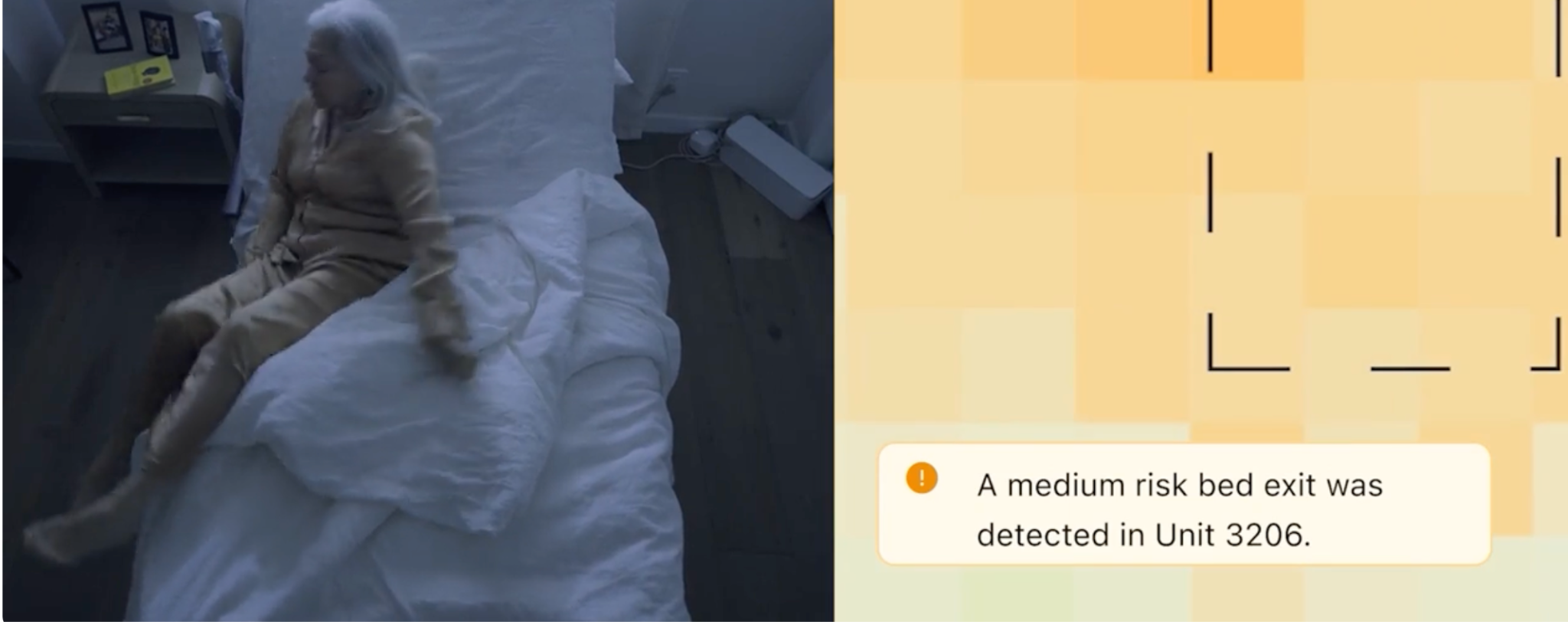
Beyond real-time alerts, Butlr Care builds a picture of each resident’s routine. Time in bed, night activity, and bathroom visits serve as fall risk indicators. Overnight wandering alerts fire when a resident leaves the bed and doesn’t return within a defined window.
Changes in daily activity patterns are co-defined with each community and configured per deployment. Care teams use these shifts as prompts for an earlier check-in, so a resident whose nighttime bathroom visits double over a week gets attention sooner.
Fits Into the Systems You Already Run
An API connects Butlr Care alerts to nurse call and care platforms. SMS, push notifications, and webhooks are available on request, and a dashboard is included.
SafelyYou has grown into a broader operations platform, while Butlr Care takes a narrower approach. Communities get fall alerts and routine insights inside the workflows their staff already use, without learning a new operations suite.
Butlr Care vs SafelyYou at a Glance
| Butlr Care | SafelyYou | |
|---|---|---|
| What’s captured | No images, no PII; staff receive alerts and trends only | Clear fall video reviewed by staff and SafelyYou’s remote clinical team; non-fall footage deleted |
| Sensing technology | Ceiling-mounted thermal sensor that reads heat only | AI-enabled camera (Guardian devices) |
| Room coverage | One sensor type covers bedrooms, bathrooms, and other key areas | Bedrooms of residents who opt in; no cameras in bathrooms |
| Alerts and insights | Real-time fall alerting, zone changes, overnight wandering, and daily routine trends | Real-time fall alerts, fall video review, virtual check-ins, hourly overnight wellness checks, sleep quality, care and ADL tracking |
| Integration approach | Dashboard included; SMS, push, and webhooks into nurse call available on request | EHR integrations (Yardi, ALIS, PointClickCare), nurse call integration, its own eCall platform (Halo), and SSO |
| Installation | Wired magnetic mount with power at each sensor location; gateway over Wi-Fi, Ethernet, or cellular | Guardian device in each enrolled room |
| Clinical and onboarding support | Structured onboarding and training for every care team, a dedicated contact, regular check-ins, and success criteria agreed before go-live | Dedicated clinical team (RNs, OTs, PTs) supports fall review and care plan interventions |
Pros
- Heat-only sensing captures no images or video, so consent conversations are simpler and there's no footage to retain.
- One sensor type covers bedrooms and bathrooms, so coverage reaches the highest-risk rooms.
- Alerts can be routed into existing nurse call and care platforms on request, with no new operations suite to adopt.
Cons
- No remote clinical team reviews falls. Support comes through onboarding, training, and regular data reviews with Butlr’s team.
- Without visual data, staff don't get fall replay, so post-fall review relies on activity and zone data.
- Sensors are wired and need power at each location, which should be factored into installation planning.
Pricing
Custom pricing available upon request.
Give your care team real-time fall alerting and daily routine insights in every room, without video. Request a demo to see how Butlr Care fits into the systems your community already uses.
Teton
Teton is a platform that places a single wide-angle optical sensor on the ceiling of each room, with infrared so it works day and night. Computer vision runs locally on a compute unit in the room, and no footage is stored or viewable by staff. Teton is expanding in the US and also offers automated rounding and an AI assistant for care teams called Samwise.
For teams that value SafelyYou’s room-level understanding but don’t want stored video, Teton is the closest match on this list.
Teton vs SafelyYou at a Glance
| Teton | SafelyYou | |
|---|---|---|
| What’s captured | No stored video; pseudonymized fall animations shared after events | Clear fall video reviewed by staff and SafelyYou’s remote clinical team; non-fall footage deleted |
| Sensing technology | Ceiling-mounted wide-angle optical sensor with infrared and on-device computer vision | AI-enabled camera (Guardian devices) |
| Room coverage | One sensor covers the full room; bathroom visits are detected as the resident leaving the sensor’s view | Bedrooms of residents who opt in; no cameras in bathrooms |
| Alerts and insights | Risk-level fall alerts, high-risk behavior alerts, automated rounding, sleep monitoring, analytics | Real-time fall alerts, fall video review, virtual check-ins, hourly overnight wellness checks, sleep quality, care and ADL tracking |
| Integration approach | EHR integrations with August Health and Yardi EHR | EHR integrations (Yardi, ALIS, PointClickCare), nurse call integration, its own eCall platform (Halo), and SSO |
| Installation | Ceiling sensor wired to an edge computer in each room; dedicated power outlet required per room | Guardian device in each enrolled room |
| Clinical and onboarding support | Site-specific delivery plan with on-site installation, resident consent, onboarding, and ongoing support | Dedicated clinical team (RNs, OTs, PTs) supports fall review and care plan interventions |
Pros
- No one views the video, a clear privacy improvement over SafelyYou's fall footage.
- Automated night rounding can reduce in-person bed checks that wake residents.
- One sensor covers the full room without blind corners.
Cons
- It’s still an optical sensor in the bedroom, so residents and families may see it as a camera even without stored video.
- Each room needs an edge computer alongside the sensor, adding hardware to install and maintain.
- It’s newer to the US market, with fewer US reference communities than SafelyYou.
Pricing
Teton doesn’t publish pricing. Contact the company for a quote.
Inspiren
Inspiren is an all-in-one senior living platform built around AUGi, a wall-mounted device with optical sensing and AI-blurred image capture. It bundles fall detection with emergency call, two-way voice, resident pendants, staff beacons, and care planning insights. A separate camera-free device called Sense covers bathrooms.
Inspiren vs SafelyYou at a Glance
| Inspiren | SafelyYou | |
|---|---|---|
| What’s captured | AI-blurred images, privacy-protected Live View and replay; residents opt in | Clear fall video reviewed by staff and SafelyYou’s remote clinical team; non-fall footage deleted |
| Sensing technology | Wall-mounted AUGi with optical sensing, plus a separate camera-free Sense unit for bathrooms | AI-enabled camera (Guardian devices) |
| Room coverage | Different devices for different rooms (AUGi for living space, Sense for bathrooms) | Bedrooms of residents who opt in; no cameras in bathrooms |
| Alerts and insights | Fall detection, bed and chair exit alerts, behavior and sleep trends, care-level insights, eCall with two-way voice | Real-time fall alerts, fall video review, virtual check-ins, hourly overnight wellness checks, sleep quality, care and ADL tracking |
| Integration approach | Full ecosystem running through Inspiren HQ, with EHR connections to August Health, ALIS, and ECP | EHR integrations (Yardi, ALIS, PointClickCare), nurse call integration, its own eCall platform (Halo), and SSO |
| Installation | Multi-device deployment across AUGi, Sense, pendants, and beacons | Guardian device in each enrolled room |
| Clinical and onboarding support | Clinician-led success team, with a clinical specialist assigned to each community | Dedicated clinical team (RNs, OTs, PTs) supports fall review and care plan interventions |
Pros
- It combines emergency call and fall detection in one system, so communities replacing an aging eCall setup can consolidate vendors.
- Blurred imagery exposes less than SafelyYou’s clear fall video.
- A camera-free device covers bathrooms.
Cons
- It still captures imagery in resident rooms, so opt-in conversations remain.
- Full room coverage requires two device types per unit.
- It’s built to replace existing emergency call infrastructure, which can make it a bigger switch than many communities want to make.
Pricing
Inspiren doesn’t publish pricing. Contact the company for a quote.
CarePredict
CarePredict is a wearable-based platform built around the Tempo wrist device, paired with location beacons throughout the community. It combines fall detection, wander management, real-time location, two-way voice, and keyless door entry, and it tracks activities of daily living to flag health changes.
As a wearable, it trades room-based sensing for coverage that moves with the resident.
CarePredict vs SafelyYou at a Glance
| CarePredict | SafelyYou | |
|---|---|---|
| What’s captured | Activity and location data tied to each resident; no cameras in the core Tempo system | Clear fall video reviewed by staff and SafelyYou’s remote clinical team; non-fall footage deleted |
| Sensing technology | Wrist-worn Tempo wearable with location beacons | AI-enabled camera (Guardian devices) |
| Room coverage | Follows residents anywhere in the community, but only while the device is worn | Bedrooms of residents who opt in; no cameras in bathrooms |
| Alerts and insights | Fall detection with per-resident sensitivity, wander alerts, real-time location, activities of daily living, health change signals | Real-time fall alerts, fall video review, virtual check-ins, hourly overnight wellness checks, sleep quality, care and ADL tracking |
| Integration approach | All-in-one platform that consolidates resident call, location, and door access; ALIS integration for care tracking; alerts from partner vision systems (KamiCare, Voxela) can route into the app | EHR integrations (Yardi, ALIS, PointClickCare), nurse call integration, its own eCall platform (Halo), and SSO |
| Installation | Wearables for each resident, plus battery-powered beacons across the community; runs on existing Wi-Fi | Guardian device in each enrolled room |
| Clinical and onboarding support | Not published; ask during evaluation | Dedicated clinical team (RNs, OTs, PTs) supports fall review and care plan interventions |
Pros
- Coverage extends beyond resident rooms to common areas, hallways, and grounds.
- The core Tempo system uses no cameras.
- Activity data supports automated care charting.
Cons
- Fall detection only works while residents wear the device, and memory care residents (SafelyYou's core segment) may remove or refuse it.
- Staff have to swap Tempo batteries on a regular schedule.
- Location data is tied to identifiable residents, so data policies need to account for continuous location records.
Pricing
CarePredict doesn’t publish community pricing. Contact the company for a quote.
Nobi
Nobi is a smart ceiling lamp with built-in optical sensors and AI that reads body position to detect falls. When it detects a fall, the lamp checks on the resident through a built-in speaker and alerts staff. Nobi is based in Belgium and growing in the US, including a rollout across Frontier Senior Living’s 56 communities.
Nobi vs SafelyYou at a Glance
| Nobi | SafelyYou | |
|---|---|---|
| What’s captured | Images from 15 seconds before and after a fall; stick figure is the default, with partial or full images as options | Clear fall video reviewed by staff and SafelyYou’s remote clinical team; non-fall footage deleted |
| Sensing technology | Ceiling-mounted smart lamp with optical sensors and AI body-position analysis | AI-enabled camera (Guardian devices) |
| Room coverage | One lamp per room, replacing the existing ceiling fixture | Bedrooms of residents who opt in; no cameras in bathrooms |
| Alerts and insights | Fall detection, fall prevention alerts, sleep and movement reports, distress indicators such as irregular breathing | Real-time fall alerts, fall video review, virtual check-ins, hourly overnight wellness checks, sleep quality, care and ADL tracking |
| Integration approach | Alerts through the Nobi dashboard and app, with alerts pushed to nurse call systems | EHR integrations (Yardi, ALIS, PointClickCare), nurse call integration, its own eCall platform (Halo), and SSO |
| Installation | Replaces the existing ceiling light; requires a Wi-Fi connection | Guardian device in each enrolled room |
| Clinical and onboarding support | Installation, system setup, and staff onboarding support | Dedicated clinical team (RNs, OTs, PTs) supports fall review and care plan interventions |
Pros
- It doubles as room lighting, so it adds no visible monitoring device to the room.
- Two-way voice lets the resident get a check-in right after a fall.
- Anonymized stick figure imagery gives post-fall context with less exposure than full video.
Cons
- Optical sensing and stored post-fall images still require consent conversations.
- Installation means replacing light fixtures room by room, which adds cost and disruption across a community.
- Nobi’s 100% fall detection claim draws on a small number of pilot sites, so ask for data from communities like yours.
Pricing
Nobi doesn’t publish pricing. Contact the company for a quote.
Questions to Ask Before Switching From SafelyYou
- What do staff and outside reviewers actually see? Ask whether anyone views video, images, stick figures, or only alerts, and who outside your community has access.
- Does coverage depend on resident opt-in? Ask what share of residents a typical community actually covers.
- How are bathrooms covered? Ask whether bathroom coverage uses the same device or separate hardware.
- Will it connect to our EHR and nurse call? Ask for a list of integrations that are live today.
- Who helps us turn alerts into care plan changes? Ask what onboarding, training, and ongoing data reviews look like after go-live.
Consider the Fall Safety Platform That Sees No One
Each platform here balances visibility and privacy differently. For communities that want real-time fall alerting in bedrooms and bathrooms without video in resident spaces, Butlr Care is worth a closer look.
Compared with SafelyYou, Butlr Care offers:
- No video, ever: Heat-only sensing means nothing to record, review, or store.
- Coverage that isn’t capped by camera opt-ins: Without cameras, coverage isn’t limited by how many residents agree to video.
- Bathrooms included: The same sensor works in the highest-risk room.
- Fits your current systems without a new operations suite: Alerts flow into the nurse call and care platforms you already run.
- Hands-on onboarding: Structured training, a dedicated contact, and regular check-ins help teams act on the data.
See how Butlr Care helps your care team respond faster while protecting resident privacy.