7 Best Fall Detection Systems for Senior Living [2026]
Fall detection systems for senior living alert staff when a resident may have fallen, so communities no longer have to rely on the resident pulling a cord, pressing a pendant, or waiting for the next scheduled room check.
These systems sense activity in each room through cameras, optical or thermal sensors, or a wearable the resident keeps on. Then, they send alerts to caregivers through a dashboard, mobile app, or nurse call system. Many also flag moments that come before a fall, like a resident getting out of bed at night, so staff can respond before anyone ends up on the floor.
Each approach comes with tradeoffs that are hard to spot in a demo:
- Where the system can go. Falls tend to happen where staff can't see them. At one skilled nursing facility, 83% of falls took place in resident rooms, and 81% went unwitnessed. Those private rooms are also where cameras raise the most consent questions with residents and families.
- What happens between falls. Some systems only report a fall after it happens. Others flag early warning signs, like more restless nights or more time spent in bed, so staff can step in sooner.
- How alerts reach your staff. A system that sends alerts to its own app adds another screen for caregivers to check. One that connects to your nurse call and care platforms fits into the workflow your team already follows.
- What residents have to do. Pendants and wristbands only help when they’re worn and charged, which is a real limitation in memory care.
This guide compares seven systems senior living operators are evaluating for fall alerting and fall risk monitoring. Along with our own platform, Butlr Care (currently available through pilot programs and included here for its possible-fall alerts and fall risk insights), it covers Inspiren, SafelyYou, Sage, Nobi, Teton, and CarePredict. Each profile explains how the system senses residents and alerts staff, its strengths and limitations, and pricing, starting with a side-by-side summary.
Fall Detection Systems at a Glance
| Sensing Method and Data Captured | Room Coverage | Fall Alerting and Review | |
|---|---|---|---|
| Butlr Care | Ceiling-mounted thermal sensor that reads heat only, with no images or identities | Bedrooms and bathrooms | Flags a possible fall and notifies staff in seconds, for caregiver review. |
| Inspiren | In-room AI device using on-device computer vision with blurred imagery | Apartments and common areas, with bathrooms covered by a separate camera-free device | Floor alerts sent to staff with a blurred view, plus fall replay |
| SafelyYou | AI camera that saves video only around detected falls | Bedrooms of consenting residents | Staff alerts with fall video ready for review |
| Sage | Room camera analyzed by vision-language AI, with clips saved around events | Rooms of consenting residents | App alerts with a video clip and no live feed |
| Nobi | Optical sensors in a ceiling light that analyze images inside the fixture | Bedrooms and living rooms, with bathrooms covered by a separate light | Phone alerts with two-way voice and an image based on the resident's privacy choice |
| Teton | Ceiling-mounted optical sensor with on-device computer vision and no stored video | Resident rooms, plus bathroom entries and exits | Fall alarms with anonymized silhouette clips for review |
| CarePredict | Wrist-worn wearable with location beacons and no cameras | Anywhere in the community with Wi-Fi | Fall alerts and help calls with two-way voice |
Butlr Care
Best For: Communities interested in piloting fall alerting and early risk signals in bedrooms and bathrooms without cameras, wearables, or anything residents need to remember.
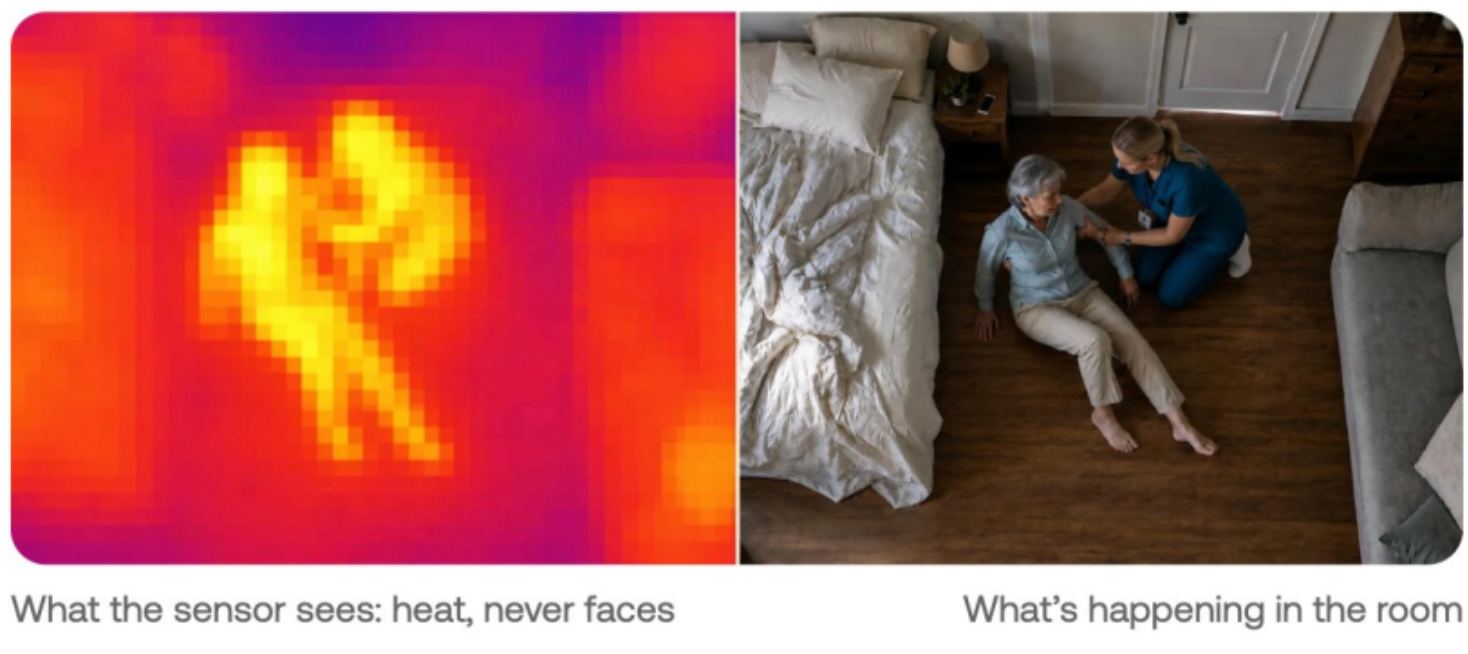
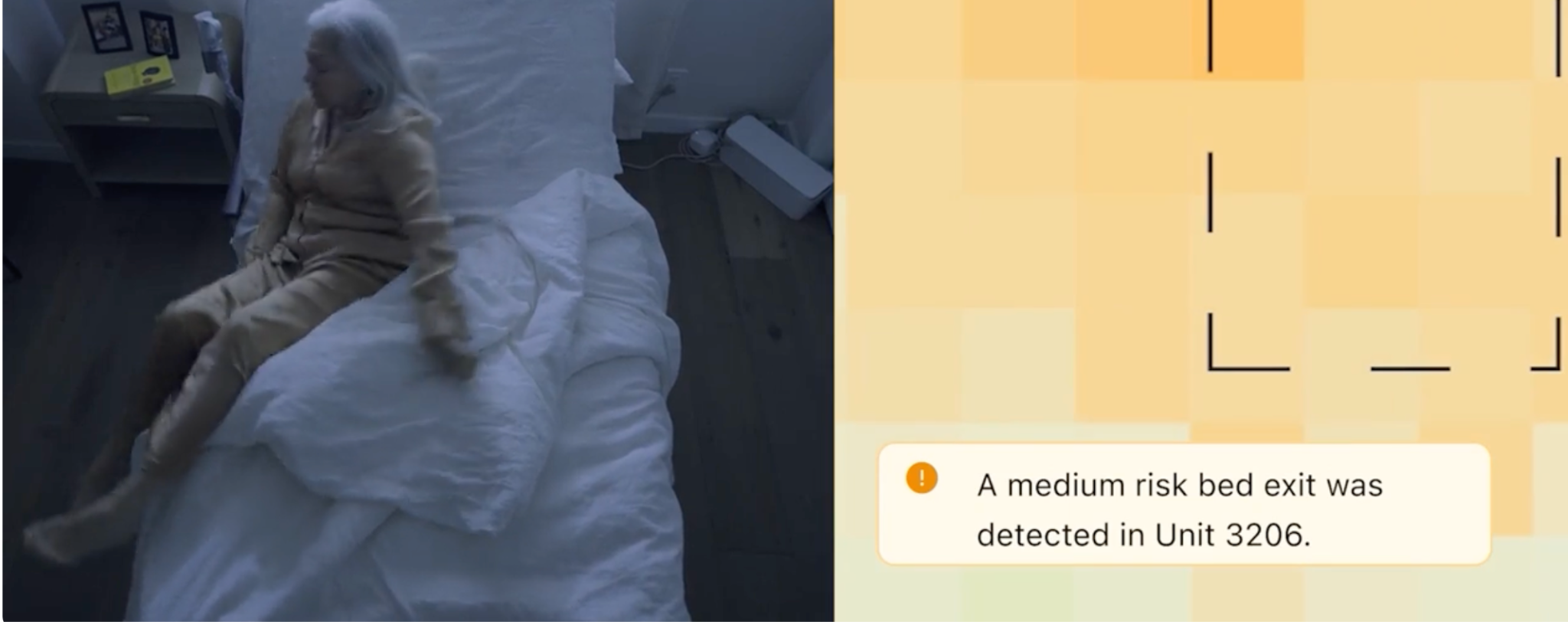
Butlr Care is an ambient monitoring platform for senior living, currently available to communities through pilot programs. Each room gets a ceiling-mounted Butlr Heatic sensor that picks up body heat, which the platform translates into alerts and daily activity trends. Staff review both on the dashboard, and Butlr can route alerts to other tools on request. Butlr calls this the Sense, Understand, Act cycle.
1. Privacy Protection Is Built Into the Hardware
Heatic sensors register heat and nothing else. Without images, video, or anything that identifies a person, there's no footage for staff to blur, store, or lock down.
Bedrooms and bathrooms are where camera-based systems run into the most resistance, and they're also where Butlr Care fits best. Operators can skip the camera explanation during consent conversations. A resident who'd refuse a camera may be comfortable with a sensor that can't see them, so fewer rooms go unmonitored.
2. Alerts Cover Possible Falls, Zone Entry and Exit, and Wandering Events
- Real-time fall alerting. Flags a possible fall and notifies staff in seconds, for caregiver review.
- Zone entry and exit. Lets staff know when a resident moves into or out of the room, the bed, or the bathroom.
- Wandering events. Notifies staff when a resident leaves the bed and doesn't return within a defined overnight window.
For example, if a resident in memory care gets up at 2 a.m. and isn't back in bed by the end of the window the community set, the night shift gets an alert to check on them.
3. Daily Insights Track Fall Risk Indicators
Butlr Care tracks time in bed and night activity as fall risk indicators. Each community works with Butlr during deployment to decide which shifts in daily activity patterns to watch, using measures such as time in bed and bathroom visits, so the patterns differ from one site to the next.
Following these measures over weeks gives staff a reason to check in when something changes, such as a resident spending more of the afternoon in bed or getting up more often at night. The data describes activity and behavior and isn't meant to diagnose a medical condition.
4. Alerts Start on the Dashboard and Can Extend to Systems Your Staff Already Use
The dashboard comes with every deployment. If a community wants alerts elsewhere, Butlr can set up text messages, push notifications, or a webhook into the nurse call system on request, based on the tools staff already use. Teams that want deeper connections can use Butlr's API to send alerts to nurse call and care platforms, so Butlr Care fits into an existing setup without replacing it.
5. Butlr Handles Installation and Setup
Butlr Care uses wired sensors, so there are no batteries to manage, and Butlr takes care of the hardware, installation, site setup, and alert configuration. From the community, Butlr needs floor plans, access to each room, and power where the sensors go. The gateway can run on Wi-Fi, Ethernet, or a cellular connection, whichever works best for the building.
Pilots include training for the care team and consent materials that communities can hand to residents and families.
Key Features
| Sensing Method and Data Captured | Butlr Heatic sensors on the ceiling that register body heat only, with no cameras, images, or identities |
|---|---|
| Room Coverage | Bedrooms and bathrooms |
| Fall Alerting and Review | Flags a possible fall and notifies staff in seconds, for caregiver review. |
| Fall-Risk Signals | Time in bed and night activity, plus activity pattern changes set up with each community (drawing on measures such as bathroom visits) |
| Zone and Wandering Alerts | Alerts when a resident enters or leaves the room, bed, or bathroom. Wandering events (a resident leaving the bed and not returning within a defined overnight window). |
| Integration and Alert Delivery | Dashboard in every deployment. Text, push, and nurse call webhooks on request, plus an API for nurse call and care platforms. |
| Installation and Infrastructure | Wired sensors. Butlr installs and configures the hardware and gateway. |
| Consent and Security | Consent materials for residents and families provided during the pilot. No images or identities captured. |
Pricing: Custom pricing available on request.
Give care teams earlier visibility into fall risk without putting cameras in residents' rooms. Learn how a Butlr Care pilot could fit your community.
Inspiren
Best For: Operators who want fall detection bundled with care planning, staff workflow tools, and emergency response from one vendor.
Inspiren is a resident safety and operations platform for senior living. Its AUGi device uses on-device computer vision to spot residents on the floor in apartments and common areas, while staff respond through the Inspiren mobile app and leaders track falls, care data, and staffing in Inspiren HQ.
A clinical team of nurses and physical therapists helps each community interpret that data and adjust care.
Key Features
| Sensing Method and Data Captured | AUGi uses on-device computer vision with blurred imagery. Sense is a camera-free bathroom monitor. |
|---|---|
| Room Coverage | Apartments and common areas through AUGi, bathrooms through Sense |
| Fall Alerting and Review | On-the-floor alerts go to staff with a blurred visual. Teams can replay falls in Inspiren HQ. |
| Fall-Risk Signals | Out-of-bed and out-of-chair alerts, plus alerts for long bathroom stays. AI flags changes in a resident's condition for care planning. |
| Zone and Wandering Alerts | Bed and chair exit alerts |
| Integration and Alert Delivery | Mobile app alerts with alert claiming and two-way voice through AUGi. Syncs with electronic health record (EHR) platforms such as August Health. |
| Installation and Infrastructure | AUGi in resident rooms and common areas and Sense in bathrooms, plus optional help buttons, pendants, and staff beacons |
| Consent and Security | Blurred imagery in apartments and image-free bathroom alerts. Safeguards that comply with the Health Insurance Portability and Accountability Act (HIPAA), including encryption and access controls. |
Advantages
- Fall safety, emergency call, care planning, and staff tracking share one platform and one set of data
- Staff can talk with a resident through AUGi as soon as an emergency alert comes in, before they reach the room
- Staff beacons record care time automatically, and communities can use that record to match care levels to the care residents receive
Things to Consider
- AUGi captures blurred images in apartments, so consent conversations with residents and families still apply
- Bathroom coverage requires a second device, Sense, alongside AUGi
- Inspiren may use de-identified resident data to train its system, so operators will want to check data terms before signing
Pricing: Custom pricing available on request.
SafelyYou
Best For: Memory care operators who want video of each fall to review how it happened and adjust care plans.
SafelyYou is an AI video platform for senior living that detects falls in resident bedrooms and records how they happened. Cameras turn on only with consent and delete non-fall footage within minutes, and the company's nurses and therapists review each fall video to recommend ways to prevent the next one.
SafelyYou also offers virtual check-ins, staff presence tracking, and wellness monitoring through SafelyYou Halo.
Key Features
| Sensing Method and Data Captured | AI cameras in bedrooms. Only fall video is saved, with no audio or live streaming. |
|---|---|
| Room Coverage | Bedrooms of consenting residents |
| Fall Alerting and Review | Staff are alerted within seconds. Fall video is available in the SafelyYou Discover web portal and mobile app. |
| Fall-Risk Signals | Clinical review of fall video identifies root causes and prevention steps. Wellness tracking covers sleep quality and daily activities. |
| Zone and Wandering Alerts | Not offered. SafelyYou focuses on fall alerts in resident rooms. |
| Integration and Alert Delivery | Triggers existing nurse call systems and the PalCare eCall platform. Resident profiles sync with EHR partners such as Yardi, ALIS, and August Health. |
| Installation and Infrastructure | A SafelyYou device with a built-in AI processor mounts in the corner of each monitored bedroom. |
| Consent and Security | Cameras turn on only after consent. HIPAA compliant. |
Advantages
- Fall video shows how each unwitnessed fall happened, which helps staff judge injuries and avoid unneeded emergency room visits
- Fall alerts can trigger a community's existing nurse call system, so staff respond through tools they already use
- Peer-reviewed research supports the system, including a study in six California memory care settings that found residents spent nearly 30 fewer minutes on the ground after a fall
Things to Consider
- Cameras only run with consent, so residents whose families decline have no coverage
- There are no zone or wandering alerts, so communities need a separate system to know when a resident leaves their room at night
- Most published outcomes come from memory care, so assisted living operators have less evidence to go on
Pricing: Custom pricing available on request.
Sage
Best For: Operators replacing an older nurse call system who want fall detection, nurse call, and care tasking on one platform.
Sage is a nurse call and fall management platform for senior living and skilled nursing that ties resident alerts, care tasks, and EHR data into one caregiver app. Its add-on, Sage Detect, puts a camera in each consenting resident's room and sends staff an alert with a clip of the 15 minutes before a fall.
Staff can’t view a live feed. Only pre-approved staff can review clips, which can be blurred for added privacy, and all video is deleted after 30 days.
Key Features
| Sensing Method and Data Captured | AI camera in resident rooms, analyzed by vision-language models. Video clips are saved only around detected events. |
|---|---|
| Room Coverage | Rooms of consenting residents |
| Fall Alerting and Review | Alerts in the Sage app include resident details, location, and a video clip. Staff claim and confirm events in the Sage app. |
| Fall-Risk Signals | Risk alerts such as trip hazards, plus trends in sleep quality, activity levels, and bathroom frequency |
| Zone and Wandering Alerts | Door sensors and access controls for elopement management |
| Integration and Alert Delivery | Built into Sage's nurse call platform. Syncs resident data, tasks, and resolved alerts with EHRs. Integrations include ALIS, ECP, Yardi, and PointClickCare. |
| Installation and Infrastructure | Cloud-based system deployed by Sage's implementation team, with about two days of on-site installation |
| Consent and Security | Residents opt in before monitoring starts. SOC 2 Type II, HIPAA, and California Consumer Privacy Act (CCPA) compliance. |
Advantages
- Nurse call, fall detection, care tasking, and EHR sync all live in one app
- Alerts pull in resident details from the EHR, so the person responding knows who they're helping before they arrive
- Wellness trends and trip hazard alerts give staff a chance to step in before a fall
Things to Consider
- Sage Detect is an add-on to Sage's platform, so communities that want to keep their current nurse call system face a larger switch
- Cameras in resident rooms require opt-in consent, so residents who decline aren't monitored
- Each alert includes a clip of the 15 minutes before a fall, so communities will want clear rules on which staff can review footage
Pricing: Custom pricing available on request.
Nobi
Best For: Communities that want fall detection combined with automatic lighting to prevent nighttime falls.
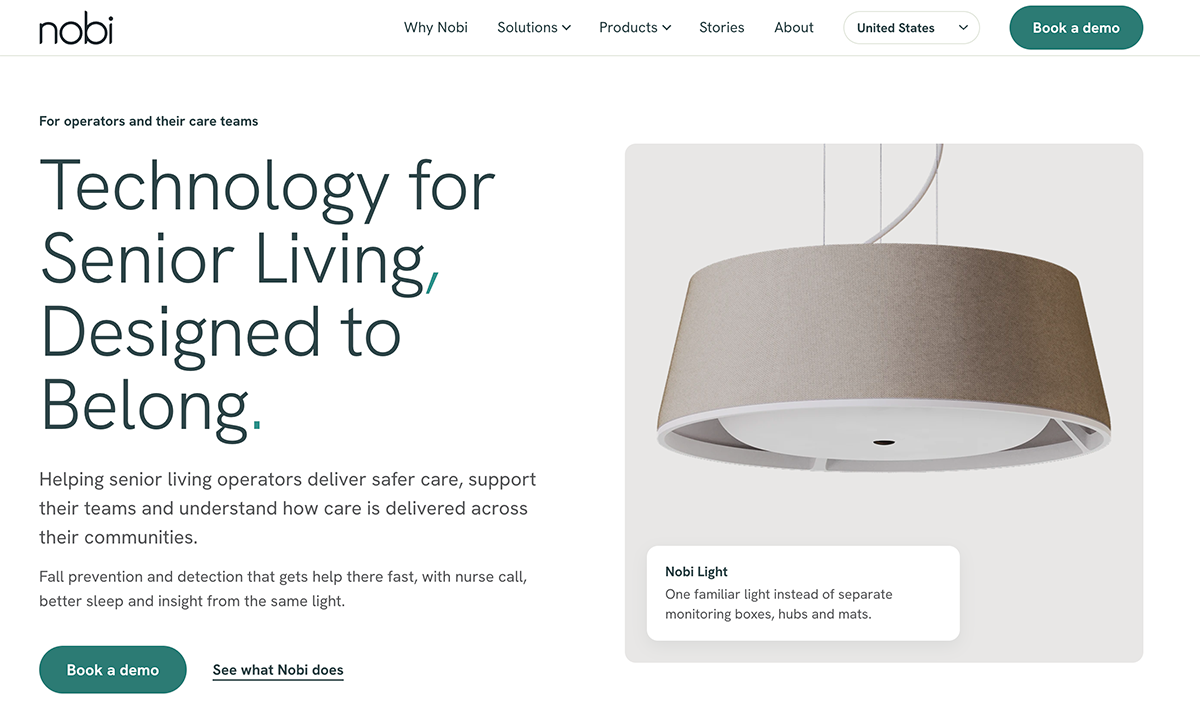
Nobi is a smart lighting system for senior living and care homes that replaces a room's ceiling light with a fixture that detects falls and helps prevent them. When a resident sits up at night, the light glows softly, brightens when they stand, and turns off once they're back in bed.
Each resident decides whether staff see a full image, an anonymized stick figure, or no image after a fall.
Key Features
| Sensing Method and Data Captured | Optical sensors analyze images inside the light. Images leave the light only for a care reason, such as a fall. |
|---|---|
| Room Coverage | Bedrooms and living rooms through the Pendant and Ceiling lights, bathrooms through Nobita |
| Fall Alerting and Review | Alerts go to staff phones and a desktop dashboard with the room and resident. A 30-second replay covering 15 seconds before and 15 seconds after a fall can be shared based on the resident’s privacy choice. |
| Fall-Risk Signals | Per-resident alerts for sitting on the edge of the bed, getting out of bed, staying out of bed too long, and long bathroom visits |
| Zone and Wandering Alerts | Alerts when a resident leaves the room at night |
| Integration and Alert Delivery | Works with existing nurse call systems or provides its own. EHR partners include PointClickCare, ALIS, August Health, and Nourish, and an open API supports custom tools. |
| Installation and Infrastructure | Trained installers replace an existing ceiling light in about 45 minutes, with no extra wiring. Each light needs Wi-Fi and constant power. |
| Consent and Security | Smart features stay off until the resident or their representative consents. Fall images are view-only and deleted after 14 days. ISO 27001 certified. |
Advantages
- Staff can talk with a resident through the light right after a fall, so they know what help to bring before arriving
- Prevention alerts are set for each resident, so staff only get bed-exit and bathroom alerts for residents who need them
- Communities can keep their current nurse call system or switch to Nobi's, depending on what they already have
Things to Consider
- Optical sensors capture images in the room, so consent and privacy conversations still apply even with stick-figure or no-image settings
- Bathroom coverage requires a separate Nobita light in addition to the main fixture
- Each room needs a strong Wi-Fi signal and constant power to the ceiling light, so some buildings may need network upgrades before rollout
Pricing: Custom pricing available on request.
Teton
Best For: Operators who want fall alerts configured around each resident's risk to cut down on unnecessary alarms.
Teton is an ambient monitoring platform for care homes, senior living, and hospitals that uses in-room computer vision to detect falls and track resident health. A ceiling sensor processes images inside the room and deletes them after analysis, sending out only alerts, health signals, and anonymized silhouette clips.
Care teams decide for each resident which behaviors stay silent, which send an alert, and which trigger an alarm.
Key Features
| Sensing Method and Data Captured | Ceiling-mounted optical sensor with infrared and on-device computer vision. Images are deleted after analysis, and no video is stored. |
|---|---|
| Room Coverage | Resident rooms, with one sensor per room. The sensor detects when a resident enters or leaves the bathroom but doesn't monitor inside it. |
| Fall Alerting and Review | Falls trigger alarms by default. Staff can review anonymized silhouette clips of each fall. |
| Fall-Risk Signals | Configurable alerts for bed-edge sitting, bed exits, and walking aid use. Trends track sleep, respiration rate, and mobility. |
| Zone and Wandering Alerts | Location alerts, such as a resident leaving the room, configurable by day and night |
| Integration and Alert Delivery | E-Call routes nurse calls to staff phones. EHR integrations include ALIS, August Health, Yardi, and Nourish. |
| Installation and Infrastructure | Teton installs the sensors and software on site, then handles resident consent, staff onboarding, and ongoing support. |
| Consent and Security | Participation is voluntary, with a resident consent step during rollout. General Data Protection Regulation (GDPR), SOC 2 Type I and Type II, HIPAA, and UK Cyber Essentials compliance. |
Advantages
- Teton drafts fall reports in the connected EHR's format, so staff review and approve them instead of writing from scratch
- Respiration and sleep baselines flag changes that often come before a fall, such as a rising overnight breathing rate
- Multiple sensors can share one 3D view of an apartment, so a resident moving between rooms is tracked as one person
Things to Consider
- The sensor captures images of the room, even though they're deleted after analysis, so consent and privacy conversations still apply
- The sensor tracks bathroom entries and exits but can't see inside, so communities need another system to detect falls inside the bathroom
- Alerts beyond falls only work if staff turn them on for each resident, so setup affects how much the system catches
Pricing: Custom pricing available on request.
CarePredict
Best For: Independent and assisted living residents who move around the whole campus and want protection outside their rooms.
CarePredict is a resident care platform for senior living built around Tempo, a wrist-worn wearable that detects falls, lets residents call for help, and supports two-way voice with staff. Tempo is water-resistant with a battery that swaps in seconds, so residents don't have to take it off to charge it.
Residents can also use it to open their suite doors and pay at the community's point-of-sale systems.
Key Features
| Sensing Method and Data Captured | Wrist-worn wearable that tracks motion, location, heart rate, and ambient conditions like light and temperature. Beacons pinpoint which room a resident is in. |
|---|---|
| Room Coverage | Anywhere in the community with Wi-Fi coverage |
| Fall Alerting and Review | Fall alerts and button calls reach staff through the CarePredict app, phone call, text, or email. Two-way voice lets staff talk with the resident right away. |
| Fall-Risk Signals | AI flags changes from each resident's baseline in movement, eating, sleeping, and socialization. |
| Zone and Wandering Alerts | Geofencing and real-time location tracking, with alerts when a resident enters an unsafe area or leaves the community |
| Integration and Alert Delivery | EHR integrations with ALIS, ECP, and PointClickCare. Also connects with door locks, point-of-sale systems, and partner fall detection cameras. |
| Installation and Infrastructure | Runs on the community's existing Wi-Fi, with location beacons placed throughout the buildings |
| Consent and Security | Residents consent before monitoring begins. Resident data stays private to the community unless a resident or authorized user shares it, and wearable data can be used to develop CarePredict's models. |
Advantages
- Communities can bill for unscheduled care using staff location data that shows when and how that care was delivered
- Care documentation is captured automatically and syncs with the EHR, so staff chart once
- Changes in daily activity can flag early signs of a health decline, including rising fall risk
Things to Consider
- Coverage depends on residents wearing Tempo, and residents with cognitive decline may remove it
- In-suite fall detection without the wearable requires a separate camera system from a partner
- Tempo relies on Wi-Fi across the community, so areas with a weak signal may go unmonitored
Pricing: Custom pricing available on request.
Questions to Ask Before You Choose a Fall Detection System
- Where can this system go, and where can't it? Ask whether it covers bathrooms and common areas. Find out whether you can turn off monitoring for residents who decline it or whose families decline on their behalf.
- What does the system store, and who can see it? Ask whether it saves video, clear or blurred images, silhouettes, or only heat signals, and who can view that data. Confirm how long the vendor keeps it and whether it uses your data to train its models.
- How do alerts reach staff, and how do they handle false alarms? Ask the vendor to show where alerts appear and how staff confirm a fall, dismiss a false alarm, or cancel an alert after it goes out. Confirm whether the system connects to your current nurse call system and EHR or needs a separate app, and how the vendor helps reduce repeat false alarms.
- Can it flag risk before a fall? Ask which changes the system tracks, such as shifts in sleep or bathroom visits, and what it tells staff about them. Have the vendor give an example of what staff should do when it flags a concern.
- What does each room need? Ask where devices mount, how they get power, and what network connection they need. Confirm who installs them and whether your team needs to arrange any wiring or network upgrades.
- What will you give us to explain this to residents and families? Ask for sample consent forms and handouts that explain how monitoring works, what data the system collects, and how residents or families can decline it.
Which system fits best depends on where it needs to work, what your staff can act on, and what residents and families are comfortable with. If you need coverage in bedrooms and bathrooms without cameras, a Butlr Care pilot lets you see how heat-based sensing works with your own residents and staff. Learn more about Butlr Care.