How Passive Monitoring Is Protecting Privacy for Seniors
Falls and overnight emergencies in senior living tend to happen in bedrooms and bathrooms. These are the rooms where residents expect the most privacy, and where staff can’t always be present.
Monitoring those rooms has usually meant a trade-off. Pendants and pull cords depend on residents who remember to wear or reach the device and can still use it after a fall. Cameras show what happened, but residents and families rarely accept them in private spaces.
Passive monitoring technology removes most of that trade-off. Sensors in the room pick up presence and movement on their own, learn what a normal night looks like for each resident, and alert staff when something changes. If a resident leaves bed at 2 a.m. and hasn’t returned 20 minutes later, staff get an alert.
How much privacy residents keep depends on the sensor. Passive options range from depth cameras to radar to thermal sensors, and each captures a different amount of information about the person in the room.
Through Butlr Care pilots and our research collaboration with older adults and clinicians, we’ve seen which privacy concerns residents and families raise most. This guide shares what we’ve learned.
What Is Passive Monitoring Technology?
Passive monitoring technology detects a resident’s presence, movement, and daily routines without the resident having to do anything.
The main difference from active monitoring is who does the work:
- Active monitoring: Pendants, wrist buttons, pull cords, and call lights. These work only if the resident wears, reaches, and presses them.
- Passive monitoring: Ceiling or wall sensors that run continuously. There’s nothing to wear, charge, or remember.
Passive systems usually run alongside nurse call systems, so residents can still ask for help.
How Passive Monitoring Works
Most passive systems follow the same four steps.
- Sensing. Sensors in the room detect presence, movement, and entry and exit between zones such as the bed, bathroom, and door.
- Baseline. Over the first few weeks, the system learns each resident’s typical patterns, such as bedtime, bathroom visits, and time out of the room. If one of your residents usually makes a five-minute bathroom trip around 3 a.m., a 25-minute visit at that hour stands out. A resident who’s often up and moving at night would have a different baseline, so the same visit might not trigger an alert. The care team at each community usually decides which patterns to track.
- Rules and alerts. Staff get an alert when activity falls outside set rules or the baseline. Common examples include:
- A bed exit without a return
- A long bathroom visit
- A resident on the floor
- Unusual activity during the night
- Delivery. Alerts appear on a staff dashboard, and many systems can also route them into tools the team already uses, such as nurse call, so staff aren't tied to one screen.
Why Senior Care Facilities Are Moving to Passive Monitoring
Four factors are pushing senior living operators away from cameras and wearables.
Falls Happen in Private Rooms
Bedrooms and bathrooms are where falls happen most often in senior living, and they’re the rooms where operators can least use cameras.
Passive sensors that capture no images can go in those rooms, so coverage follows the risk instead of stopping at the hallway.
Wearables Don’t Get Worn
Residents forget pendants, take them off to bathe, or refuse to wear them at all. Residents with cognitive impairment may not be able to press a button after a fall, even when the device is on their wrist.
A passive sensor works whether or not the resident remembers it's there.
Staff Can’t Be Everywhere
Staffing shortages make scheduled overnight rounding hard to sustain, and every room check risks waking a resident who was sleeping well.
Passive check-ins let staff confirm a resident is in bed and settled without entering the room. Butlr Care, for example, shows night staff whether each resident is in bed, so rounds can focus on the residents who need attention.
Cameras Create Consent and Trust Problems
Several states have electronic monitoring laws that let residents place cameras in their rooms, but only after the resident and any roommate sign a written consent form. Examples include Illinois, Minnesota, New Mexico, Oklahoma, Rhode Island, Texas, and Washington. Some states, such as Rhode Island and Minnesota, also cover assisted living.
This paperwork exists because cameras capture identifiable images of everyone in the room, including residents, roommates, staff, and visitors.
What Each Sensor Type Can and Can’t Capture
The table below compares what the most common monitoring options capture.
| Captures Images | Can Identify a Person | Suited to Bathrooms | Needs Resident Action | Detects Someone Who Isn’t Moving | |
|---|---|---|---|---|---|
| Video camera | Yes | Yes | Rarely accepted | No | Yes |
| Depth / 3D camera | Body outlines | Sometimes | Limited acceptance | No | Yes |
| Radar | No | No | Yes | No | Often |
| PIR motion sensor | No | No | Yes | No | No |
| Wearable (pendant, watch) | No | Tied to the wearer | Only if worn | Yes | Depends on device |
| Thermal sensor | No | No | Yes | No | Yes |
Two rows are often misunderstood, even by operators who have already evaluated passive systems:
- Depth cameras. They're often marketed as privacy-friendly because they show outlines instead of faces, but they still capture body shape and movement detail that residents may consider identifying.
- Passive infrared (PIR) sensors. These are private, but they only register motion. A resident lying still on the floor can look the same as an empty room. Thermal sensing detects body heat, so it registers a resident whether they're moving or not.
Privacy by Hardware Design
The design choice behind Butlr Care is a useful test for any system an operator evaluates.
Some systems protect privacy through policy. They blur images, limit who can view footage, or delete recordings after a set period. The raw data still exists at some point, and the protection depends on those rules holding.
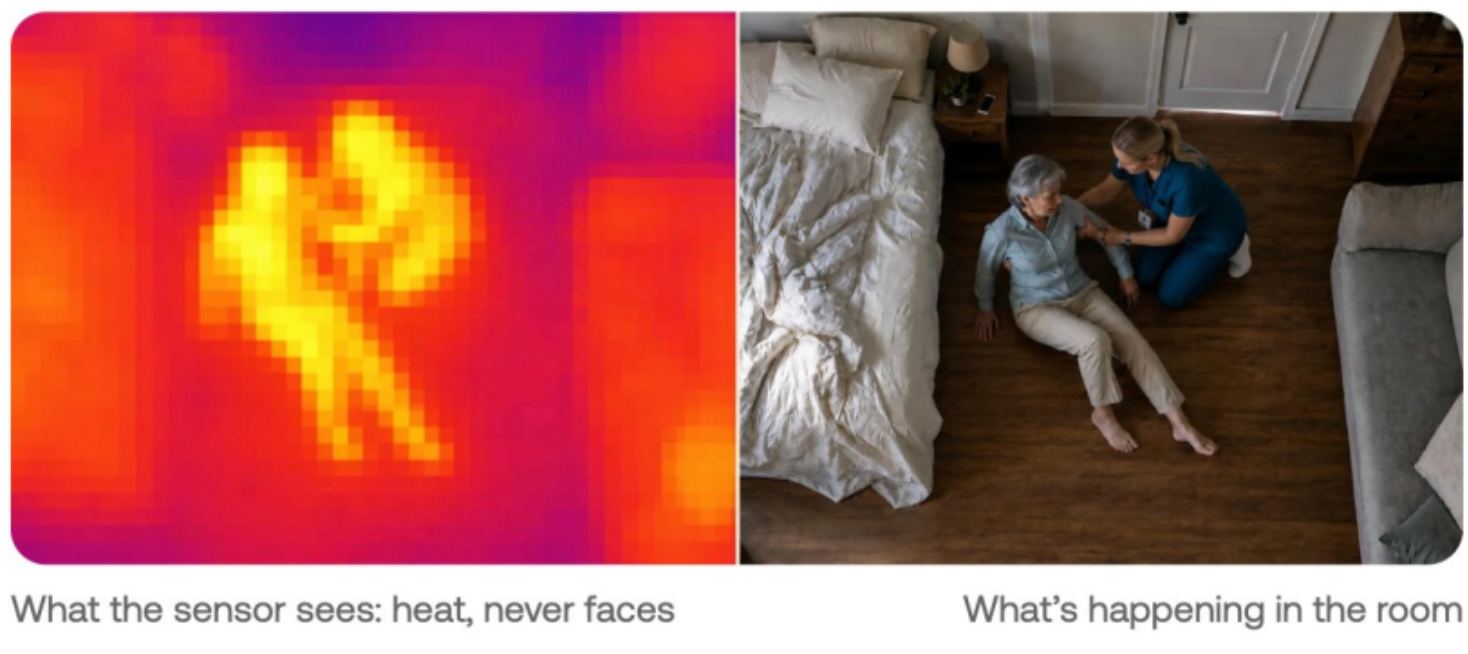
Thermal sensing protects privacy through hardware. Butlr Heatic sensors read low-resolution heat signals only, so images and identities are never created in the first place.
For operators, that changes three things:
- Placement: Sensors can go in bathrooms and bedrooms with a simpler consent conversation than cameras require.
- Data handling: There is no image data or personally identifiable information to store, secure, or hand over if a family asks for footage.
- Family conversations: Staff can tell families that the sensor reads body heat, and it can’t see faces.
The same data supports both real-time response and longer-term care planning. Butlr Care flags a possible fall and notifies staff in seconds, for caregiver review. Daily measures like time in bed and night activity serve as fall risk indicators that care teams can review over weeks and months.
Butlr also took part in a research project through the MassAITC research center with UMass Amherst and Hebrew SeniorLife, funded by the National Institute on Aging. The study tested whether ceiling-mounted heat sensors could track movement patterns linked to frailty in older adults.
To see how Butlr Care brings camera-free monitoring to bedrooms and bathrooms, learn more here.
How to Explain Passive Monitoring to Residents and Families
Even with a sensor that captures no images, residents and families need to understand what's in the room and why.
Clara Berridge’s study in The Gerontologist (2016) interviewed residents, family members, and staff at six low-income independent living buildings that had offered a passive monitoring system for six years. Staff often avoided telling residents why they were following up on an alert. They worried residents would feel their privacy had been invaded, and many residents didn’t fully understand what the system detected.
When residents don’t know what a sensor picks up, a routine check-in can feel intrusive, even from a system that never records an image. Picture an aide knocking at 7 a.m. to ask whether a resident slept poorly. If that resident didn’t know the system tracks time in bed, the question can sound like someone was watching.
Before installation, make sure residents and families can get clear answers to these questions:
- What does the sensor detect (heat and movement), and what doesn’t it capture (images, audio, identity)?
- Which events trigger an alert, and who receives it?
- How long is activity data kept? Ask your vendor for a specific retention period and get it in writing.
- How can a resident or their representative ask questions or opt out?
Choosing a System Residents Will Accept
Residents will only accept a system that covers the rooms where falls happen, gives them nothing to wear or remember, and comes with a clear answer when a family asks what the sensor can see.
Butlr Care is in pilot with senior living communities now. If you’re exploring camera-free monitoring for your community, let’s talk.