


.svg)


How to Measure Meeting Room Utilization (+ Tools to Use)
A room booking system can tell you which meeting rooms were reserved. It can’t tell you whether anyone showed up, how many people attended, or whether a 12-person room keeps getting used for two-person calls.
Those blind spots make it hard to decide how many rooms to keep, which ones to resize, or whether complaints about room shortages reflect real demand. Booking data on its own tends to protect rooms that sit empty and hide the ones that are oversubscribed.
Many teams are working from that data anyway. In a Butlr survey of 400 U.S. building and facilities decision-makers, desk or room reservation systems were the most-cited method for tracking space utilization (55%). Employee surveys (54%) and sensor-based occupancy data (53%) were close behind.
Accurate meeting room data comes down to two choices: which metrics you track and which tools you use to collect them. This guide covers:
- The metrics that give a full picture of meeting room use
- How each measurement method compares on accuracy, privacy, and effort to scale
- Tools for room booking, workplace analytics, and occupancy sensing
What Meeting Room Utilization Measures
Meeting room utilization is the share of available room time that’s actually in use. One number rarely describes a room well, though.
A room can be booked all day and sit empty for half of it, or stay occupied by groups far smaller than its capacity. These four metrics together cover what each one misses on its own:
- Booking rate: Booked hours ÷ available hours. Shows how much demand reservations suggest.
- Time utilization: Occupied hours ÷ available hours. Shows how much of the day the room is actually in use.
- Seat fill: Average attendees ÷ room capacity. Shows whether room capacity matches meeting size.
- No-show rate: Bookings with no one present ÷ total bookings. Shows how much booked time is wasted.
For example, a room available 9 a.m. to 5 p.m., Monday through Friday, has 40 available hours a week. If it’s occupied for 18 of them, time utilization is 45%. If it’s a 10-person room averaging three attendees, seat fill is 30%.
Time utilization counts a room as in use whether one seat is filled or all ten, so seat fill is the metric that shows when a smaller room would serve the same meetings.
No-show rate also picks up ghost meetings, or recurring bookings that keep holding a room after the meeting itself stopped happening. They’re a common reason a room shows as fully booked in the calendar but sits empty whenever someone walks past.
Healthy rates vary by room type, hybrid schedules, and intended use. Our office space utilization benchmarks cover typical ranges.
How to Measure Meeting Room Utilization
Measurement methods differ in whether they capture what was booked, whether the room was occupied, and how many people were in it. Few capture all three.
Badge and Wi-Fi data are common occupancy sources, but they report at the building or floor level rather than by individual room. For methods that cover whole floors and buildings, see our guide on how to measure office occupancy.
Booking and Calendar Data
Booking data captures reservations, scheduled duration, and invite lists.
Pros:
- Already in place in most offices, so there’s no new hardware or setup
- Shows booking demand and peak reservation windows across the portfolio
- Provides the baseline booking rate that other data gets compared against
Cons:
- Misses no-shows and meetings that end early
- Misses walk-in use without a booking
- Inflates assumed headcount by counting remote attendees on invites
In the Butlr survey, 62% of decision-makers said they can’t tell how office space is actually used without asking employees directly or observing them with privacy-compromising technology. That includes uses booking data never shows, such as conference rooms doubling as private offices
Room Panels and Check-Ins
Panels and check-ins confirm that a meeting started.
Pros:
- Frees up rooms held by no-shows in real time
- Shows room availability at the door, so people spend less time hunting for a free room
- Produces a measurable no-show rate
Cons:
- Depends on people remembering to check in
- Confirms that a meeting started but doesn’t capture duration or headcount
- Needs hardware outside every room, and misses walk-ins unless they book at the panel
Manual Observation Studies
Staff walk the floor at set intervals and record whether each room is occupied and how many people are inside.
Pros:
- Requires no technology investment
- Captures headcount and how rooms are being used, such as a conference room used as a private office
- Works as a one-time baseline in a single office
Cons:
- Snapshots miss everything between walk-throughs
- Labor-intensive, so studies run for days or weeks rather than continuously
- People may change behavior when they know they’re being observed
Occupancy Sensors
Occupancy sensors capture actual presence continuously, and some types also capture headcount.
Pros:
- Continuous, objective data that doesn’t depend on employee behavior
- Captures walk-ins, no-shows, and early endings
- Can trigger auto-release in booking platforms
Cons:
- Upfront hardware and installation cost
- Capabilities and privacy profiles vary widely by sensor type
- Data quality depends on full coverage and correct room mapping
Three sensor types show up most often in meeting rooms:
- PIR (passive infrared): Detects motion to infer presence. It’s low cost, but it can mistake a meeting with little movement for an empty room and doesn’t count people.
- Thermal: Detects body heat to provide presence and headcount without capturing images. Butlr’s sensors use this approach.
- Camera-based: Delivers accurate headcount, but because the hardware captures images, deployments often face privacy, legal, IT, and works council reviews that can slow or block rollouts.
That review process is a bigger constraint than many teams expect. In the Butlr survey, 92% of decision-makers said privacy considerations are a barrier to getting space utilization data, and 63% called it a moderate to major obstacle. For camera-based sensors, that hurdle often decides whether a rollout reaches every room or stalls after the pilot.
How These Measurement Methods Compare
Of the methods compared, only occupancy sensors with headcount show both whether a room was used and whether its size fit the group. Butlr’s thermal sensors do that without cameras and feed the data into the booking tools teams already use.
Want to see how booked time compares with actual use across your meeting rooms? Learn more about Butlr for workplaces.
Tools for Measuring Meeting Room Utilization
Meeting room tools differ by the kind of data they produce. Booking platforms show intent, analytics platforms combine sources, and sensors show what actually happened in the room. Accurate data usually comes from pairing a sensor with a booking or analytics platform, so integration and deployment time are the practical filters when choosing between them.
In the Butlr survey, integrating with existing systems was one of the top barriers to adding new monitoring tools (48%), and 90% expressed concern about how long it takes to install and start collecting usable data. For a broader look at the category, see our roundup of the top office space utilization software.
Room Booking and Scheduling Platforms
Robin
Robin is a workplace platform for room and desk booking, with check-ins and auto-release of unused reservations. Logitech lists Robin among the booking platforms supported by its sensor-driven Auto Book and Auto Release feature. Without check-ins or connected sensors, Robin’s view of occupancy is limited to reservations.
Best for: Hybrid offices that need room booking with auto-release.
Envoy
Envoy lets employees reserve and check in to rooms from desktop, mobile, Slack, Microsoft Teams, or a display outside the room, and releases unused bookings automatically. Its room resizer nudges meeting owners toward a smaller room when a large one is booked for only a few confirmed onsite attendees, and onsite room recapture targets ghost meetings. Room sizing still relies on attendee confirmations instead of measured headcount.
Best for: Teams already using Envoy for visitors or desks.
Ricoh Spaces
Ricoh Spaces is a booking platform with room panels and analytics. It combines room booking data from Microsoft 365 or Google Workspace with desk booking and occupancy sensor data in a single view. Ricoh and Butlr formed a capital and business alliance in January 2025 that includes plans to bring Butlr sensors into Ricoh Spaces
Best for: Single-vendor rollouts that include room hardware.
Workplace Analytics and IWMS Platforms
FM:Systems
FM:Systems is an integrated workplace management system (IWMS) with built-in room scheduling. Its booking analytics compare planned and actual meeting length and participant count for right-sizing, peak utilization analysis, and no-show reporting. The “actual” side of that comparison comes from integrated sensors.
Best for: Tying room data to space planning in an IWMS.
Basking
Basking is an occupancy analytics platform built for corporate real estate teams. Its meeting room features recommend how many rooms a site needs and in what sizes. They draw on PIR, barrier count, and thermal sensor data along with booking data from workplace apps. Basking also supports Wi-Fi-based occupancy, though that data doesn’t break down by room.
Best for: Portfolio-level CRE analysis across sites.
Metrikus
Metrikus is a data aggregation platform. Its meeting room view shows current, average, and peak seats in use and ranks rooms by performance. Its Microsoft 365 integration compares bookings with actual occupancy to surface underused rooms and mismatches between room size and group size.
Best for: Combining room occupancy with energy and air quality data.
Occupancy Sensors
Logitech (Rally Bar with Sync Insights)
Logitech’s Sync Insights reports anonymous participant counts per room using AI-based object detection built into its video bars. Logitech says the counts contain no personally identifiable information or media, and that it doesn’t use facial recognition. On most devices, counting happens only while the camera is in use during video meetings. Rally Bar and Rally Bar Mini on recent firmware can also report occupancy outside meetings when that setting is turned on. It requires a paid Sync Plus or Logitech Select subscription, and because the hardware is still a camera in the room, it may go through the same privacy reviews covered above.
Best for: Rooms that already have Logitech video bars and need participant counts during meetings.
Butlr
Butlr’s thermal sensors provide room-level presence and headcount with no images and no personal data, whether or not a meeting or video call is running. The sensors are battery-powered, install without an electrician, and can be deployed across a portfolio in weeks. REST APIs and webhooks push the data into booking and analytics platforms like the ones above, so measured headcount shows up alongside reservations in the tools teams already use.
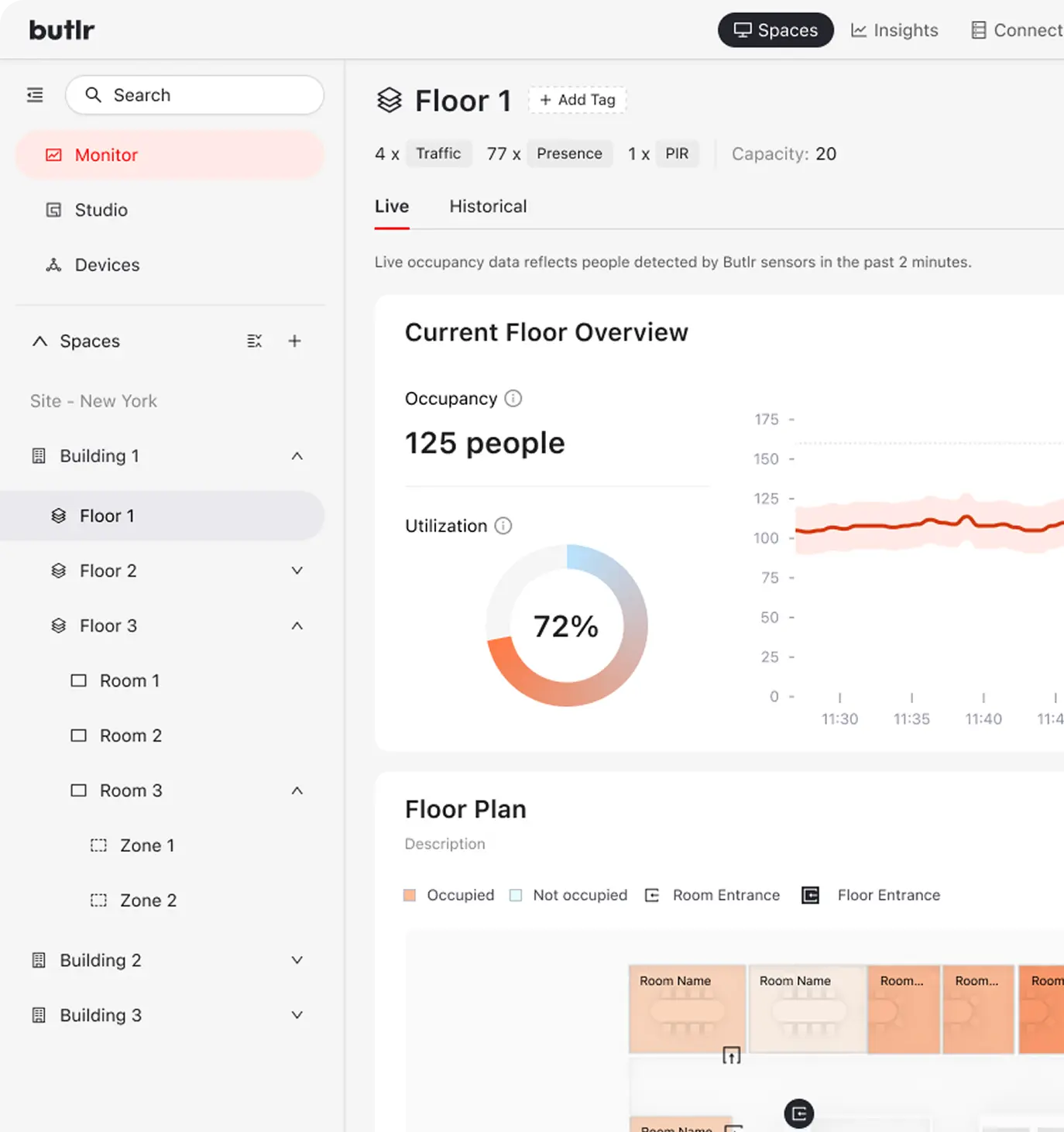
Best for: Continuous room-level headcount without cameras, across every room type, including huddle rooms without video hardware.
Teams that combine room data with lease or financial data often pull it from these platforms into BI tools like Tableau, where meeting room utilization can sit next to cost per square foot and lease terms. Our guide to conducting an office space utilization analysis covers how to turn that combined view into decisions.

.png)
.webp)