


.svg)


A Guide to Office Occupancy Data for Workplace Teams”
Office occupancy data is easy to collect and hard to act on. A workplace team can pull last week's attendance in minutes and compare it against a city-wide index. Yet the questions with real money attached often stay open, such as which floor to give back, which rooms are the wrong size, and which wing is being heated for nobody.
In a Butlr survey of 400 U.S. building and facilities decision-makers, 79% said data challenges have hindered their ability to make layout changes. Nearly all of them already use at least one method to measure how their space is used. The data exists, but it sits at the wrong level of detail for the decision in front of them.
This guide covers what office occupancy data refers to, how to read the public indexes from Kastle, Kisi, and Placer.ai, the four levels of data you can collect inside your own building, and what a dataset needs to contain before you base a lease, layout, cleaning, or HVAC decision on it.
What "Office Occupancy Data" Refers To
The phrase is used for three different datasets:
- Market occupancy data: Published indexes showing how full offices are across a city or country, such as those from Kastle, Kisi, and Placer.ai. Useful for context and for executive conversations.
- Attendance data: How many of your own people came into a building on a given day, usually pulled from badge systems.
- Space-level occupancy data: Which floors, rooms, and desks inside your building are in use, by how many people, and for how long.
The occupancy rate brokers report often gets pulled into the same conversation. It is a leasing metric that measures leased space as a share of total inventory, so a building can be fully leased and mostly empty on a Friday.
Occupancy and utilization also get used interchangeably. Occupancy is a point-in-time count, while utilization describes use over a period. For full definitions and formulas, see our article on how to measure your office's occupancy.
Each of these datasets answers a different question. Problems start when one is used to answer a question that belongs to another.
Public Office Occupancy Data: What the Indexes Tell You
Most people searching for office occupancy data want the headline figure for how full offices are this week, nationally or in their city. Three sources publish those figures regularly. The readings change every week or month, but the way each index is built changes rarely, and that construction determines what a reading means.
How Each Index Is Built
Each index measures against its own baseline. Kastle and Placer.ai both compare current activity to a pre-pandemic period, so a reading of 60% means 60% of the activity that sample saw before the pandemic. Kisi compares daily unlocks to each company’s own near-peak day from the past two years. None of the three translates into a seat count for your building.
How to Use Market Data (and Where It Stops)
Market data works well for:
- Framing a leadership conversation, for example showing that your Tuesday attendance is in line with or above your metro
- Spotting day-of-week patterns that hold across the market
- Sense-checking your own attendance trend against peers
However, it has three limits:
- Every index counts entries or visits, so none of them describe what happens on the floor
- Each reflects one vendor's customer footprint, which skews toward certain building classes and cities
- A metro average says nothing about whether your fourth floor is full on Wednesdays
Market data tells you how your attendance compares. The decisions that change your costs depend on data from inside your own building. For utilization ranges by space type from CBRE and JLL, see our office space utilization benchmarks.
The Four Levels of Occupancy Data Inside Your Building
The methods decision-makers in the Butlr survey use most are desk and room reservation systems (55%), employee surveys (54%), sensor-based occupancy (53%), and badge data (51%).
Organizations hold plenty of data about who came into the building and which floors they went to, then use it to make room and layout decisions. Sorting your data by the level it describes, whatever technology collected it, makes that mismatch easy to spot.
For a full comparison of collection methods, see our guides to measuring office occupancy and office building occupancy sensor types.
Level 1: Building Entry
Badge and access control data is reliable for attendance trends and for checking whether a hybrid policy is being followed. If most of a week's badge-ins land on Tuesday, you know Tuesday is the busy day, but the data stops at the door.
Which floors were crowded, which rooms sat empty, and whether people spread across the building or packed into one wing all stay unknown.
Level 2: Floor
Floor-level counts, usually from entrance traffic sensors or Wi-Fi zones, let you compare floors against each other. A floor that rarely gets past a third full while the one above it runs out of seats is a natural consolidation candidate.
Floor data treats the whole floor as a single space, so a redesign or a change in services within the floor needs more detail. A floor reading of 70% could mean every desk in the open-plan area is taken while the meeting rooms along the far wall sit empty, and the count alone won’t show you which.
Level 3: Room and Zone
Operational decisions become possible with room and zone data. Cleaning can follow actual use, the room mix can be adjusted to how people meet, and HVAC zones can be set around where people sit.
Most buildings aren't running on data at this level yet. In the Butlr survey, half of decision-makers set one cleaning schedule based on building-level occupancy, and only 18% base cleaning schedules on occupancy data for each space.
Under one schedule, a restroom on the busiest floor and a conference room that sat empty all week get the same service.
Level 4: Activity
Activity data describes how a space is used once someone is in it. Differences between intended and actual use show up at this level in patterns like:
- A 12-person room used by two people most of the day
- A break room that regularly hosts meetings
- A conference room working as someone's private office
These patterns rarely surface on their own. In the survey, 62% of decision-makers have no way to learn about unexpected uses of space without asking or observing employees. Surveys still earn a place at this level, since sensor data shows what people do and surveys help explain why they do it.
Butlr's thermal sensors run in two modes, traffic and presence, so one deployment produces floor-level counts at entrances and room-level presence and headcount inside. The data stays anonymous at every level because the sensors read heat signatures and capture no images or personal information.
What a Usable Occupancy Dataset Contains
Once you know the level you need, check whether the dataset holds the fields your decision depends on.
- Peak and average, reported separately. Sizing to the average causes crowding on busy days, and sizing to the peak leaves space empty the rest of the week. Our utilization benchmarks cover typical ranges for both.
- Headcount against capacity. "Occupied" is a yes or no. Headcount shows whether a room fits the meetings held in it.
- Dwell time. How long a space stays in use separates a room people pass through from one they work in.
- Booked versus actual use. The difference between reservations and presence exposes no-shows and rooms held but not used.
- Traffic flow. Entries and exits by floor or zone show movement patterns and how busy shared spaces get.
- Time resolution. HVAC and cleaning dispatch need data in near real time, while lease and layout decisions need months of history.
- Coverage. A full-floor dataset supports decisions about that floor, and a sample of a few rooms supports only estimates.
- A clear label for where each number came from. When two floors report different figures, you need to know whether the floors differ or the sensor setups do.
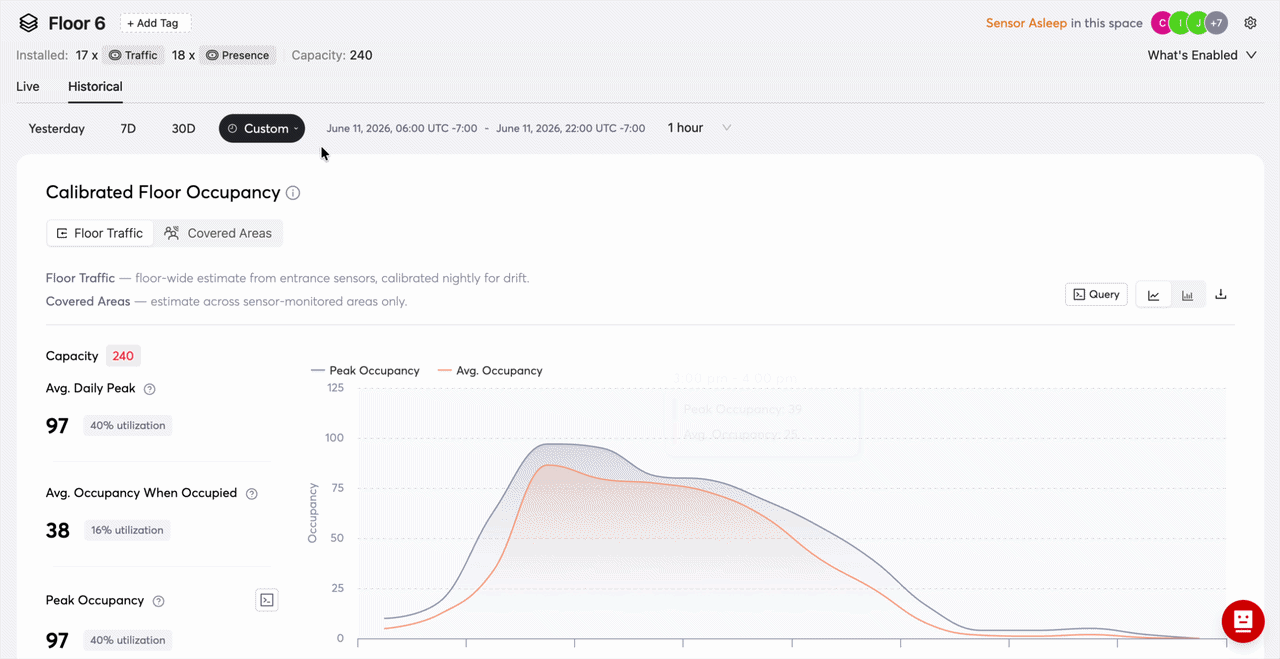
That last point is easy to overlook until two reports disagree. This is why Butlr's dashboard (pictured below) opens each floor with a setup card showing the sensor mix and what data that setup can produce, and it labels the data source behind each number. On floors with both entrance and presence sensors, it reconciles the two into one calibrated floor occupancy figure.
Where Occupancy Data Has to Go to Become a Decision
Decision-makers in the Butlr survey describe two opposite data problems. Sometimes there is too much data to turn into action, and other times there isn't enough useful data to inform the decision.
The report also found that the organizations getting the most value from occupancy data share it with functions outside facilities. A dashboard that only the facilities team opens rarely changes a lease, a cleaning contract, or a setpoint. The data has to reach the system or the person that acts on it.
For example, RICOH Spaces, a workplace management platform that handles meeting room reservations, desk booking, and visitor management, now draws on Butlr occupancy data. On its own, a booking platform shows only what was reserved.
Sensor data adds whether anyone showed up and how many people used the room, so workplace teams can see real-time and historical use of meeting rooms, desks, and other workspaces next to the reservations and adjust layouts to match.
The same principle applies across the decisions occupancy data most often informs:
- Lease and portfolio sizing: Several months of floor and room history, combined with lease and financial data in a BI tool
- Space mix: Room and activity history showing which desks, focus rooms, and meeting rooms are over- or under-supplied, fed into the IWMS or space planning platform
- Cleaning by actual use: Real-time room and zone data delivered to the cleaning platform that dispatches staff
- HVAC by real demand: Real-time zone data sent to the BMS so setpoints follow presence
In the Butlr survey, 60% of decision-makers believe better utilization insight would produce measurable savings in cleaning costs, and 50% say the same of staffing. Nearly all (99%) say uncertainty about how their space is used has disrupted renovation or construction plans in the past five years.
Those savings and plans depend on the data reaching the systems that schedule crews, set temperatures, and model leases.
Getting it there usually takes an integration with each of those systems. Butlr is API-first and connects to the IWMS, BMS, BI, and cleaning platforms teams already run, so occupancy data arrives where decisions are made. Learn more about Butlr.
Questions to Ask Before You Can Trust Your Occupancy Data
Whether you're looking at a public index, a vendor report, or an internal dashboard, the same questions apply:
- Is the event being counted an entry, a booking, a device, or a person present?
- Does it describe the building, floor, room, or activity level?
- Is coverage complete, or is it a sample of spaces?
- How often is it updated, and how much history is available?
- Can it be combined with lease, booking, and badge data in the tools we already use?
- Will the collection method pass legal, IT, and works council review?
The last question stops more projects than the other five. In the Butlr survey, 92% of decision-makers say privacy considerations are a barrier to getting the utilization data they need, and 63% call it a moderate to major obstacle, a figure that rises to 69% at organizations with more than 1,000 employees.
Most teams with an occupancy data problem already collect plenty of it. The fix is data at the level of the decision they're trying to make, delivered to the system that will act on it.
If your team needs room-level occupancy data by next month, Butlr's battery-powered sensors install without an electrician and can be rolled out across a portfolio. Request a demo.
.png)

%20(1).png)
.png)
.webp)