A Practical Guide to Ambient Sensor Systems for Senior Care
Senior living care teams can’t be in every resident’s room at once. Many of the events they most need to catch, like falls and overnight bed exits, happen in bedrooms and bathrooms when no staff member is present.
Traditional safety tools miss many of these moments. Pull cords and pendants only work if the resident is able to use them, and bed pressure pads only report that someone has already stood up.
Ambient sensor systems use sensors installed in the room to pick up presence, movement, and daily routines without anything for residents to wear or press. If a resident leaves bed overnight and doesn’t return within a set window, for example, staff get an alert. Over several weeks, the same sensors can show gradual changes, such as more hours in bed during the day, that warrant a closer look.
The sensing technology you choose determines how well this works in practice. Some sensors capture images, which residents and families rarely accept in bedrooms or bathrooms. Others cover only one spot, like a single bed or doorway, and some send enough false alerts that staff start ignoring them.
This guide draws on Butlr’s work with senior living communities through Butlr Care, which is currently deployed as pilots. It covers:
- How ambient sensor systems work and what they’re made of
- How eight sensing technologies compare on privacy, room suitability, and limitations
- The use cases they support, from fall alerts to changes in daily routine
- What to ask vendors and how to plan your first deployment
What Is an Ambient Sensor System?
An ambient sensor system is a set of passive, non-wearable sensors installed in a resident’s room, whether on the ceiling or wall, under the bed, or at a doorway. The sensors detect presence, movement, and activity patterns across the whole room or zone, and the system sends that information to care staff.
A typical system has four parts:
- Sensors in resident rooms and shared spaces
- A gateway that connects sensors to the network over Wi-Fi, Ethernet, or cellular
- Software that turns raw signals into alerts and trends
- Alert delivery through a dashboard, mobile push notifications or SMS, or an integration with nurse call and care platforms
Most communities keep pull cords, pendants, or pressure pads in place for specific high-risk residents and add ambient sensing as a room-level layer. The two approaches answer different questions, so they tend to work best together.
How Ambient Sensing Works in a Senior Living Community
Ambient systems follow the same basic three-stage flow:
- Sense. Sensors read signals from the room continuously. Depending on the technology, that could be motion, heat, radio waves, pressure, or sound.
- Understand. Software converts those signals into events, such as entering the bathroom or leaving the bed, and compares activity against thresholds your team configures.
- Act. Staff get real-time alerts for time-sensitive events. Trend reports flag gradual changes, like more nighttime activity or more daytime hours in bed, that are easy to miss on any single shift but obvious across two weeks of data.
That produces two kinds of output, and care teams need both.
- Real-time alerts call for a response now. A possible fall or an overnight bed exit with no return falls in this category.
- Behavioral insights are reviewed on a regular cadence. A gradual shift in routine is easy to miss on any single shift but obvious across two weeks of data.
Either output is only useful if it reaches the right person at the right time. Systems that ask staff to check yet another app tend to see low adoption, which is why integration with existing care tools gets its own section below.
Types of Ambient Sensors Used in Senior Care
Each sensing technology makes different trade-offs between detail, privacy, and practicality. The table below compares the eight most common options.
Ambient Sensing Technologies Compared
PIR motion sensors. Passive infrared sensors are inexpensive and familiar, and many buildings already have them for lighting control. Because they respond to motion, a resident lying still on the floor can look the same as an empty room.
Door and contact sensors. These are useful for simple signals, like a refrigerator that hasn’t opened by mid-morning. They report that something opened or closed, so staff still need other context to understand what it means.
Bed and chair pressure pads. Pressure pads are a common tool for residents at high risk of falls. They cover one surface only, and the alert arrives after the resident has already stood up.
Radar and mmWave. Radio-based sensors detect movement and presence without images, and some vendors also report breathing patterns. Performance can vary with room layout and building materials, so ask vendors how they handle installation in your specific rooms.
Wi-Fi sensing. This approach infers motion from disruptions in Wi-Fi signals. It can work with less dedicated hardware, but spatial detail is lower and results depend heavily on the network setup.
Acoustic sensors. Audio-based systems listen for sounds that may indicate a fall or distress. Many residents and families are uncomfortable with microphones in private rooms, and televisions or roommates can interfere with accuracy.
Cameras and computer vision. Cameras provide the most detailed view of posture and movement. They also face the most resistance in bedrooms and bathrooms, along with longer privacy and legal reviews.
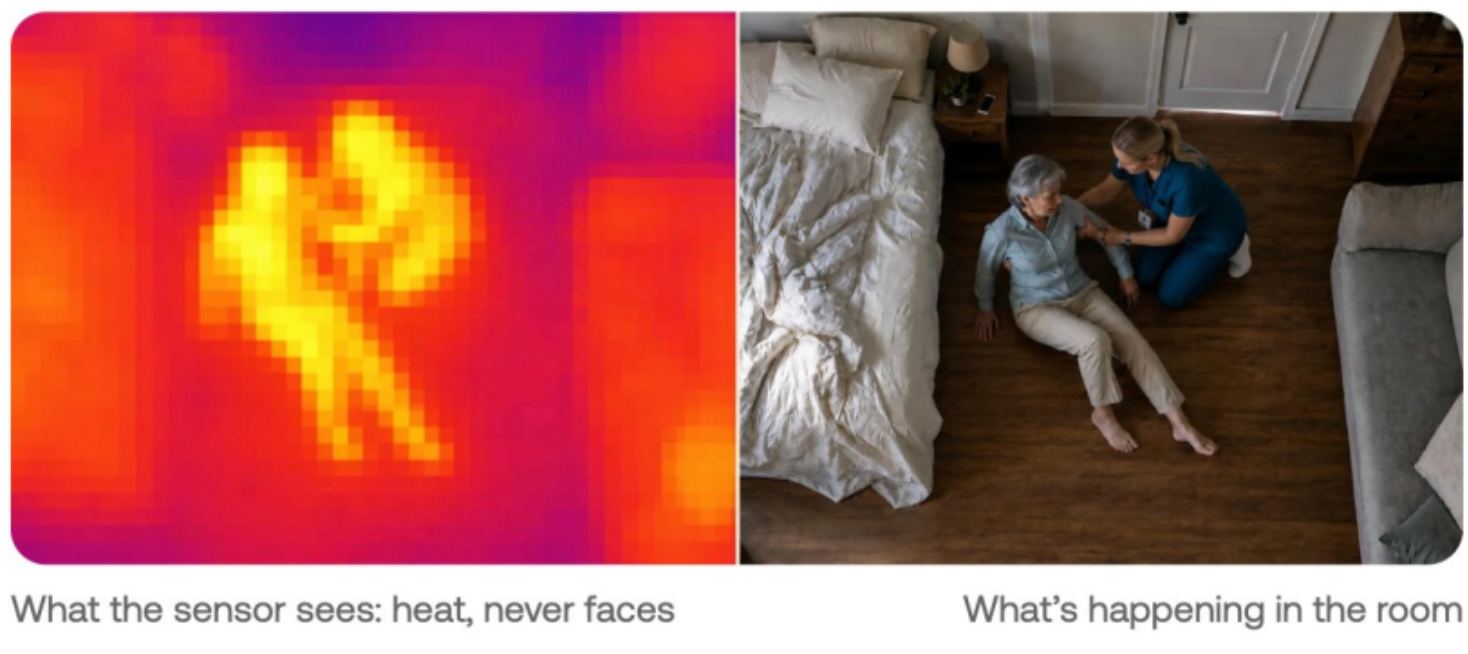
Thermal sensors. Thermal sensors read heat signatures to determine presence, position, and movement without capturing images. Butlr’s Heatic sensors, which power Butlr Care, take this approach and never capture images or identities.
No single technology covers every need. Communities often combine a few, such as pressure pads for specific high-fall-risk residents plus room-level ambient sensing. For most operators, the first filter is whether residents and families will accept the sensor in a bedroom and bathroom. The sections below pick up from there.
What Ambient Sensors Monitor: Core Use Cases
Possible-Fall Alerts
More than one in four U.S. adults aged 65 and older reports a fall each year, according to the CDC.
Real-time fall alerting flags a possible fall and notifies staff in seconds, for caregiver review, so help can arrive without the resident pressing a button or waiting for the next scheduled room check. Staff go to the room, assess the resident, and either respond or clear the alert.
Bed, Room, and Bathroom Exits
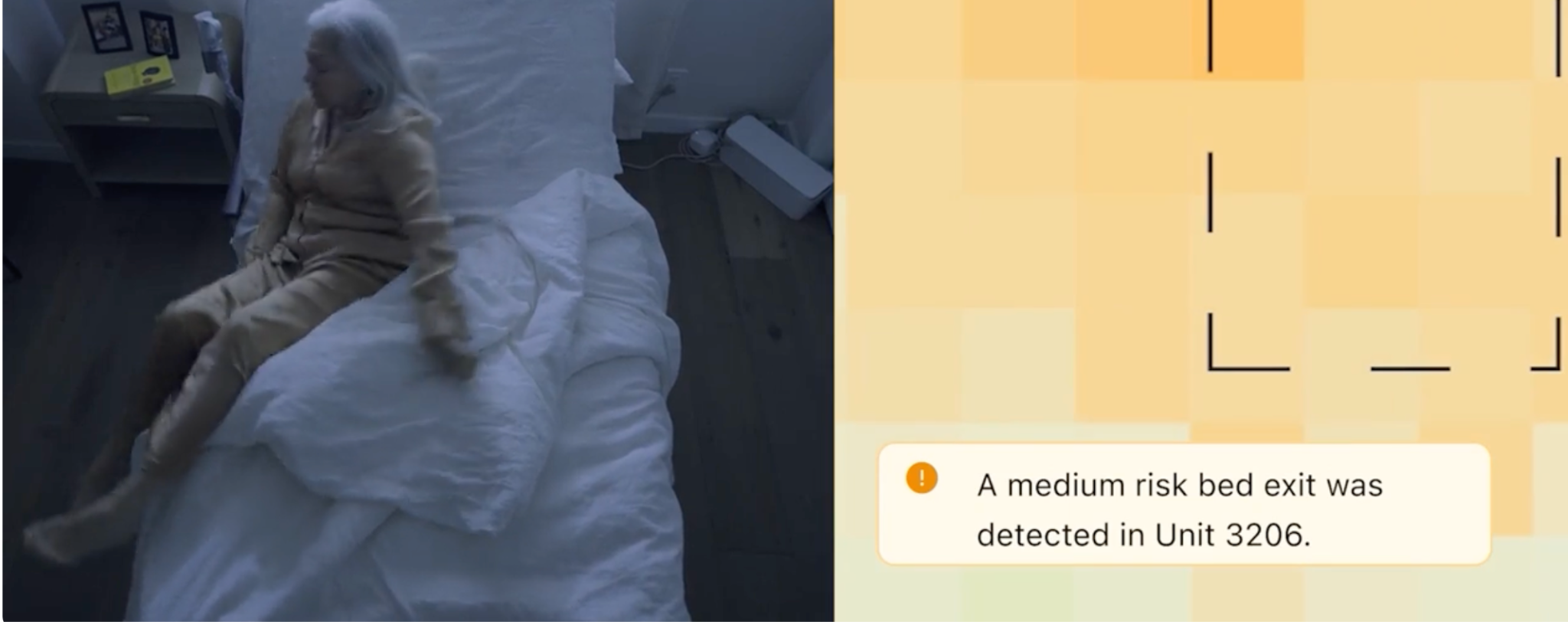
Zone alerts cover a resident entering or leaving the room, the bed, or the bathroom.
Knowing a resident went into the bathroom 20 minutes ago and hasn’t come out is more useful than knowing they got out of bed. Staff can check in or go to the room depending on how long the resident has been in a given zone.
Wandering Events
In Butlr Care, a wandering event is a resident leaving the bed and not returning within an overnight window that each community sets during deployment.
Wandering alerts are most useful in memory care, where unaccompanied overnight movement is a safety risk. When an alert comes in, staff locate the resident and help them back to bed or address whatever got them up.
Changes in Daily Routine
Time in bed, nighttime activity, and the number of bathroom visits can all point to a change in routine or rising fall risk that calls for a closer look from care staff. Say a resident who usually gets up once a night starts making four or five bathroom trips a night over a week. No single night looks unusual, but the pattern gives your nursing team a reason to check in, especially since frequent overnight trips to the bathroom are a common setting for falls.
Butlr Care defines these patterns with each community during deployment.
Staff Workflow and Rounding
A real-time view of which rooms show a resident up, in bed, or in the bathroom helps staff decide where to go first during rounds. At 2 a.m., if the dashboard shows most residents in your hall in bed and one who has been in the bathroom for 15 minutes, you know which door to knock on first and which rooms can wait. It can also cut down on overnight room checks that wake residents who are sleeping soundly.
Where Ambient Sensors Go and Why Privacy Decides It
The rooms where falls and safety events are most likely to happen, bedrooms and bathrooms, are also the most private. Whether residents and families will accept a sensor in those rooms is the deciding test for any ambient system.
Room-by-Room Placement
- Bedrooms: Bed exits, overnight activity, time in bed, and possible falls near the bed.
- Bathrooms: A high-risk location for falls. Sensors here capture entry and exit timing and flag prolonged stays. Image-capturing sensors are a non-starter.
- Hallways and common areas: Movement between spaces and use of shared areas.
- Memory care units: Overnight bed exits and wandering events (a resident leaving the bed and not returning within a defined overnight window).
What Residents and Families Need to Hear
Residents and families will ask what the sensor sees, who has access to the data, and whether anyone can watch them through it. Have plain-language answers ready before installation, and share written materials before go-live that explain what is and isn’t captured.
Legal and compliance review also moves faster when the system never captures images or personally identifiable information, since there’s less to justify, store, and protect.
Butlr Care's ceiling-mounted Heatic sensors read anonymous heat signals only, so communities can place them in bedrooms and bathrooms. A few specifics:
- Fall alerting: Flags a possible fall and notifies staff in seconds, for caregiver review.
- Nothing to wear: Residents have no device to charge or remember.
- Consent support: Butlr provides ready-to-share resident consent and notification materials as part of onboarding.
Butlr Care was developed with input from older adults, through a research project co-led by Amanda Paluch, PhD, of UMass Amherst and Dae Hyun Kim, MD, MPH, ScD, of Hebrew SeniorLife. The project was funded by grant P30AG073107 from the National Institute on Aging through MassAITC.
See what Butlr Care’s thermal sensors capture in a resident room.
How to Evaluate and Roll Out an Ambient Sensor System
Questions to Ask Any Vendor
- Does the sensor capture images, audio, or personally identifiable data?
- Can it be installed in bathrooms, and will residents and families accept it there?
- What triggers a possible-fall alert, how is it reviewed, and can staff cancel a false alarm?
- How are wandering and routine-change alerts defined, and can you configure them per resident or unit?
- Do alerts reach staff through a separate app or through your existing nurse call and care platforms?
- What does installation require (power, network, mounting), and will it disrupt residents?
- What onboarding and training does the vendor provide for care staff?
Integration With Existing Systems
Staff adoption drops when alerts live in one more app that caregivers have to remember to open. Look for API and webhook support that routes alerts into nurse call and care platforms, plus SMS and push notification options.
Every Butlr Care deployment includes a dashboard. SMS, push notifications, and webhooks into nurse call systems are available on request and are configured around what the community already uses.
Planning a Pilot Deployment
Start by agreeing on goals and success measures, such as fit with the overnight care workflow, staff adoption, and feedback from caregivers, residents, and leadership. Once the pilot is live, review results against those measures on a regular cadence and adjust alert settings as you learn.
What a Butlr Care Pilot Looks Like
See how a Butlr Care pilot would fit your community’s overnight workflow and existing systems. Butlr Care is currently in pilot with senior living communities.
Frequently Asked Questions
Are ambient sensors medical devices?
It depends on the product and the claims made about it. Ask each vendor directly about its regulatory position.
Do ambient sensors replace staff rounds?
No. They help staff prioritize where to go and respond faster to time-sensitive events. Care decisions stay with the care team.
What does a community need to install an ambient sensor system?
Typically floor plans, room access, power at sensor locations, and a network connection for the gateway. Plan for staff training time and a way to inform residents and families before go-live.