5 Inspiren Alternatives for Senior Living Monitoring (2026)
Inspiren has earned a reputation as a strong all-in-one platform for senior living, especially for communities that want fall detection, emergency call, and care planning bundled into a single system. But it doesn’t fit every community.
Care and operations teams often run into friction with optical sensors in resident rooms that require opt-in conversations with residents and families, separate hardware needed to cover bathrooms, and an ecosystem built to replace existing emergency call infrastructure instead of connecting to it. For communities that already run a nurse call system they’re happy with, or that serve residents and families with strong privacy expectations, these issues can slow adoption or stall rollouts entirely.
This article breaks down the top Inspiren alternatives, from thermal sensors and smart lights to wearables and anonymized computer vision. For each platform, we’ll cover key features, how it compares to Inspiren, pros and cons, and what type of community each one fits best.
Shortcomings of Inspiren
Inspiren brings emergency call, fall alerts, care planning, and staff tracking into one platform. Operators using it have reported fewer falls and faster response times. But that breadth comes with tradeoffs, especially for communities with strong privacy expectations or a nurse call system they want to keep.
- Optical sensing in resident rooms adds approval steps: AUGi captures blurred images of the room and gives staff a privacy-protected live view and event replay. Even with blurring, imagery in a bedroom means communities need consent conversations with residents and families.
- Bathrooms require separate hardware: Inspiren monitors bathrooms with Sense, a separate camera-free unit. Full coverage means installing and maintaining two device types instead of one.
- Emergency call runs through Inspiren's own devices: AUGi acts as the hub for Inspiren's pendants, help buttons, staff beacons, and Sense. Communities happy with their current nurse call platform may face a bigger switch than they planned for.
- More devices mean more installation and upkeep: Every device type in the ecosystem adds hardware cost and needs to be installed, maintained, and covered in staff training. Across a full community, that can stretch rollout timelines and give frontline staff more equipment to learn and troubleshoot.
- Staff access to imagery raises the bar for privacy policies: With live view and replay, communities need clear rules on who can see resident imagery and when. Those rules carry extra weight in memory care, where residents may not fully understand what they're consenting to.
Each alternative addresses these concerns differently, from heat-only sensing to wearables that move with the resident.
Best Inspiren Alternatives at a Glance
Butlr Care
Butlr Care is camera-free ambient monitoring for senior living, currently offered to communities through pilot programs. A Butlr Heatic sensor on each room's ceiling picks up only heat, so it never records images, faces, or identities. Staff get real-time alerts and daily activity trends on a dashboard, and alerts can also route into nurse call and care platforms.
Input from older adults and researchers drives the development of Butlr Care technology. Its design draws from a collaborative pilot project co-led by researchers at UMass Amherst and Hebrew SeniorLife and funded by the National Institute on Aging.
1. No Images to Blur, Review, or Consent To
Thermal sensing takes visual data out of the picture entirely. The sensor reads heat signatures only, so there's no footage to protect at any stage. Residents keep their privacy in the rooms where they expect it most, and families don't have to weigh the idea of a camera in a loved one's bedroom.
Consent conversations get simpler too, because they center on what alerts staff will receive rather than what staff can see. Butlr also provides consent and notification materials that communities can share with residents and families, so teams don't have to write their own.
With Inspiren, AUGi captures blurred images and lets staff open a live view or replay events, so communities need policies for who sees that imagery and when. Butlr has no images to blur, live view to restrict, or replay footage to govern.
2. One Sensor Type for Bedrooms and Bathrooms
Butlr's Heatic sensor works in bedrooms and bathrooms, the private spaces where camera-based systems face the most resistance. In addition to fall alerts, it tells staff when a resident moves between zones, such as getting into bed or stepping into the bathroom.
Inspiren splits that coverage across two devices, with AUGi in living spaces and Sense in bathrooms. Using one device type instead keeps procurement, installation, and staff training simpler.
3. Works With the Nurse Call System You Already Run
Every Butlr Care deployment includes a dashboard. On request, Butlr can send alerts by text message, push notification, or webhook into a nurse call system, set up around the tools the community already uses. Communities with more complex setups can use Butlr's API to pass alerts to their nurse call and care software.
Butlr Care doesn't include its own emergency call or two-way voice. It's built to work alongside a community's existing nurse call system, so communities that recently invested in one can keep it.
Switching to Inspiren would mean moving emergency calls onto its own pendants, help buttons, and AUGi devices.
4. Daily Routine Signals Worth a Closer Look
Butlr Care tracks three daily routines that can point to fall risk. It monitors how long a resident stays in bed, how active they are overnight, and how often they visit the bathroom. During deployment, each community decides how much change in those routines should prompt attention.
Staff also get wandering alerts, which fire when a resident leaves the bed and doesn't come back within a defined overnight window. If a resident starts lingering in bed through the afternoon or making extra trips to the bathroom after midnight, the care team has a reason to check in sooner. They're activity signals that prompt a check-in, and the care team's clinical judgment decides what comes next.
Butlr Care vs Inspiren at a Glance
Pros
- Butlr Care’s sensor only registers heat and generates no footage of anyone, so residents and families are easier to get on board.
- A single sensor type covers bedrooms and bathrooms, so there's only one device to deploy, maintain, and train staff on.
- Butlr's API can send alerts to existing nurse call and care platforms, and text, push, and webhook delivery are available on request.
Cons
- Butlr Care has no built-in emergency call or two-way voice, so communities without a nurse call system will need one alongside it.
- Without visual data, staff can't replay a fall. Post-fall review draws on alert history and activity trends instead.
Pricing
Custom pricing available upon request.
Give your care team real-time fall alerts and daily routine insights in every room, without cameras. Request a demo to see how Butlr Care fits into the systems your community already uses.
Nobi
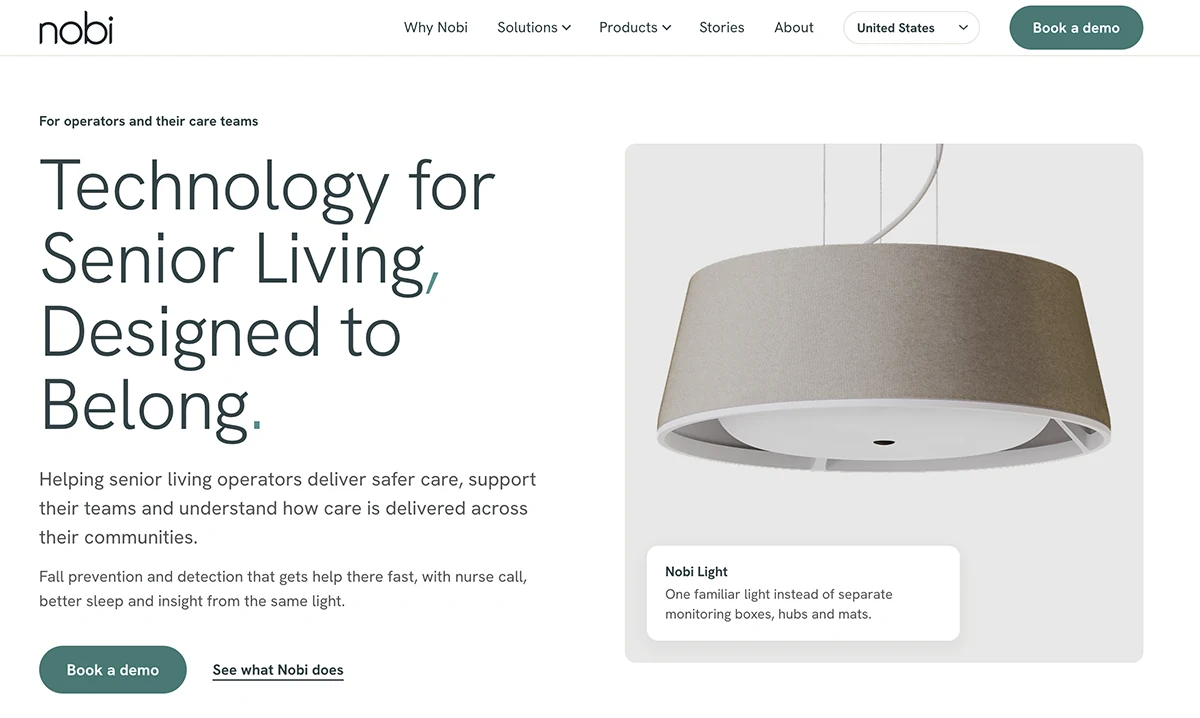
Nobi is a smart light that replaces a room's ceiling fixture. Optical sensors and an AI processor inside the light read body position and flag when someone is on the floor. Staff get the alert on their phones and can talk to the resident over the light's built-in speaker.
Nobi vs Inspiren at a Glance
Pros
- The light also handles circadian and nighttime lighting, so there's no extra monitoring device on the wall or ceiling.
- Staff can talk to a resident over the light's speaker as soon as a fall alert comes in.
- Short fall clips help care teams see what led to a fall and adjust care.
Cons
- Optical sensing means consent conversations much like Inspiren's, even with stick-figure or no-image settings.
- Bathrooms need a separate Nobita light, so full coverage still means two device types.
- Every light needs steady power and a strong Wi-Fi signal, so some buildings may need network work before rollout.
Pricing
Custom pricing available upon request.
CarePredict
CarePredict is a wearable-based care platform that centers on Tempo, a wristband paired with location beacons placed around the community. A single device handles fall detection, wander alerts, location tracking, two-way voice, and keyless door entry.
Tempo also tracks daily activities like eating and sleeping to flag changes in a resident's health. As a wearable, it trades room-based sensing for coverage that moves with the resident wherever Wi-Fi reaches in the community.
CarePredict vs Inspiren at a Glance
Pros
- Coverage follows residents into dining rooms, hallways, and other shared spaces.
- Activity data feeds automated care documentation, so unscheduled care gets captured and billed.
- Tempo uses no cameras, so imagery never enters the privacy conversation.
Cons
- Coverage stops when a resident takes Tempo off, and that risk runs highest in memory care.
- Tempo batteries need regular swapping, another routine task for staff.
- Continuous location tracking tied to named residents means data policies need to cover who can see movement history.
Pricing
Custom pricing available upon request.
Teton

Teton is a room monitoring system built on a wide-angle optical ceiling sensor. Infrared lets it work day and night, and a single sensor can cover a full room. A wired compute unit processes the images in the room, and no video is stored or shown to staff. Teton also offers automated rounding, a nurse call system (E-Call), and an AI assistant for care teams.
Teton vs Inspiren at a Glance
Pros
- Automated rounding gives night staff a way to check on residents remotely instead of opening doors and waking them.
- Images are processed and deleted inside the room, so no video reaches Teton's servers or staff.
- Teton drafts fall reports for staff to review and file in the EHR, so documentation takes less time.
Cons
- Residents and families may still see the ceiling sensor as a camera, even though it stores no video.
- Each room needs a compute unit wired to the sensor, so there's more hardware to install and maintain.
- Bathroom visits register at the doorway, but the sensor has no view inside, so bathroom falls need another system.
Pricing
Custom pricing available upon request.
SafelyYou
SafelyYou is a fall detection system that installs AI-enabled cameras in the corner of consenting residents' bedrooms to catch falls as they happen. It saves footage only around an on-the-ground event and deletes everything else within minutes. Staff review fall clips in a web portal or mobile app, and SafelyYou's nurses and therapists study fall videos to recommend prevention steps. Its newer SafelyYou Halo platform builds the same fall detection into an emergency call system.
SafelyYou vs Inspiren at a Glance
Pros
- Fall video shows staff how a fall happened, and that context helps with injury assessment and care plan changes.
- SafelyYou's clinical team brings fall expertise many communities don't have on staff.
- Fall alerts can feed into the nurse call system a community already runs, so staff respond through familiar tools.
Cons
- Coverage depends on consent, so residents who decline have no fall monitoring in their rooms.
- Recorded fall video is kept for staff and clinical review, so privacy policies need to cover who can watch it.
- Without zone or wandering alerts, communities need a second system to know when residents leave their rooms overnight.
Pricing
Custom pricing available upon request.
Questions to Ask Before Switching From Inspiren
- What happens to our nurse call system? Find out whether the new platform plugs into the nurse call setup you have or expects you to swap it out. If it connects, ask which systems it supports and what the connection does.
- What can staff see? Some platforms show staff full images or video, others show blurred views or stick figures, and some send alerts with no visuals at all. The answer shapes how you approach consent with residents and families.
- Is bathroom coverage included? Ask whether the same device works in bathrooms or whether you'll need to buy and install a second one. A second device adds cost and another piece of equipment for staff to manage.
- Does anything depend on the resident? Wearables need to stay on and charged, and call buttons only help when someone presses them. Ask what happens to coverage when a resident forgets or refuses.
- How does the system cut down on false alerts? Ask how staff confirm or dismiss an alert and whether sensitivity can be adjusted for each resident.
Consider the Monitoring Platform That Puts Privacy and Integration First
Each platform here takes its own approach to sensing and privacy. For communities that want monitoring without cameras and without replacing the systems they already run, Butlr Care can be a good fit.
Why Butlr Care is worth a closer look:
- Nothing to blur: The sensor registers heat only, so there are no images or identities to manage, and consent conversations stay focused on alerts.
- One sensor for bedrooms and bathrooms: Communities deploy and maintain a single device type instead of separate hardware for each space.
- Works alongside your nurse call: Butlr's API can pass alerts into existing nurse call and care platforms, with text, push, and webhook options available on request.
- Nothing for residents to wear: Coverage doesn't depend on residents remembering a pendant or pressing a button.
- Signals that support earlier check-ins: Daily trends in time in bed, night activity, and bathroom visits give care teams a reason to check in sooner. Overnight wandering alerts flag a resident who leaves the bed and doesn't return within a defined window.
See how Butlr Care helps your care team respond faster while protecting resident privacy.